


 Top Rated Course

We may not have the course you’re looking for. If you enquire or give us a call on +55 8000201623 and speak to our training experts, we may still be able to help with your training requirements.
What is Figma? Feature, Benefits and Examples
Richard Harris 16 July 2026Figma is a cloud-based design and prototyping tool for websites and apps, offering real-time collaboration, vector editing, file sharing, and version control. It streamlines the workflow for websites and apps through intuitive vector editing, effortless file sharing, smart version control, collaborative creativity, and enhanced design efficiency.

Training Outcomes Within Your Budget!
We ensure quality, budget-alignment, and timely delivery by our expert instructors.
Table of Contents
Picture a place where designers, developers, and product teams could work together easily from any location. Figma makes that possible. Introduced in 2012, Figma is a game-changing cloud-based design platform that transforms the way ideas come to life as interactive digital experiences.
Figma allows teams to do graphics editing, iterate and share freely because it offers real-time collaboration, an intuitive UI and powerful prototyping. This blog shall explore What is Figma, its backbones and the reasons it has risen to be the most used design tool in the world in the hands of modern creators.
Table of Contents
1) What is Figma?
2) Key Features of Figma
3) How to Use Figma?
4) Benefits of Using Figma
5) Real-time Use Cases of Figma
6) What Makes Figma Different from Adobe XD or Sketch?
7) Conclusion
What is Figma?
Figma is a vector graphics editing and prototyping platform that operates in the cloud. It is designed for interface design built for collaboration and remote work. You find all the elements at every step you need to complete a design workflow, from coming up with ideas, wireframing, to generating exportable code.
It can be accessed via a web browser and a desktop app. Its versatility made it a great option to design websites, mobile apps, and various digital products. Its rich plug-in ecosystem, tools to organise and collaborate, have made Figma a favourite in modern designer's toolkit.

Key Features of Figma
Figma’s popularity stems from its host of features, making it a suitable tool for individuals and large teams. Let’s explore some of these key features:

a) Real-time Collaboration:
Collaboration in Figma is one of its most powerful features. Multiple team members can work on the same design file at the same time, providing live feedback and edits. With Figma, you don’t have to worry about version control issues, as everyone always sees the latest version
b) Prototyping:
Figma goes beyond static designs by enabling interactive prototypes directly integrated into the platform. You can create clickable flows, transitions, and micro-interactions to simulate real-world user experiences. Prototyping in Figma is easy, with no need for additional software, which speeds up the design validation process.
c) Cross-platform Accessibility:
Since Figma operates entirely in the cloud, it is accessible from any device with an internet connection and a browser. Whether you’re working on Windows, Mac, or even a Chromebook, you can easily access your files. This cross-platform compatibility makes Figma a truly versatile tool.
Ignite your passion for animation with our exclusive Animation Course.
d) Vector Networks:
Traditional vector tools rely on paths that are difficult to manipulate freely. Figma’s vector networks break away from these limitations, allowing you to draw in any direction without getting restricted by paths. This feature provides Designers with more flexibility and creativity.
e) Design Systems:
Consistency is critical to a good user experience, and Figma’s design system feature allows you to create reusable components like buttons, icons, and forms. You can establish a library of these elements, ensuring your designs remain consistent across different projects. This is beneficial for large teams working on complex design systems
How to Use Figma?
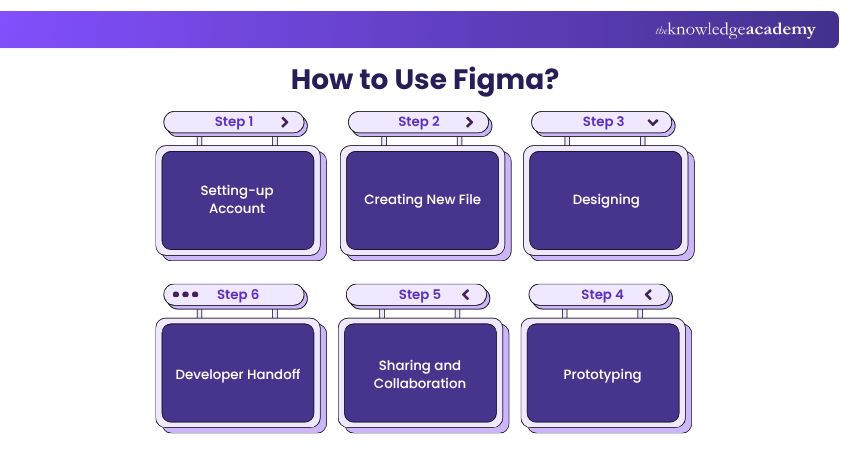
Getting started with Figma is straightforward, but its comprehensive toolset ensures it can cater to beginners and advanced Designers. Here’s a step-by-step guide on how to begin using Figma:
a) Setting up an Account:
Figma offers a free plan to access most of its core features. You can log in using your email or through Google and immediately start working on your first project.
b) Creating a New File:
Once logged in, you’ll be greeted with the option to create a new design file. You can start from the beginning or import existing files from other design tools like Sketch. Figma’s interface is intuitive, with a left panel for layers, a central canvas for design work, and a right panel for properties and settings.
c) Designing:
Figma’s design toolkit includes everything from shape tools to text editing options and advanced features like constraints and auto-layout for responsive designs. Depending on your project's requirements, you can create wireframes, mockups, or even high-fidelity prototypes.
d) Prototyping:
Transitioning from design to prototype is seamless in Figma. You can create interactive prototypes that mimic user flows by linking different frames and setting up transitions. The prototypes can be shared via a link, allowing stakeholders to interact with them and provide feedback.
e) Sharing and Collaboration:
Collaboration is where Figma truly shines. You can welcome team members to view and edit your files by sharing a link. Team members can leave comments, make suggestions, or work together in real-time, making the feedback loop more efficient.
f) Developer Handoff:
Once the design is finalised, you can easily hand it off to developers. Figma generates CSS code, measurements, and assets, which developers can access directly from the design file, reducing back-and-forth communication.
Learn essential video editing techniques to create engaging content with Video Editing Course – Join now!
Benefits of Using Figma
The first point that you must be very clear about is that Figma is not a design system, it is a tool applied in building and managing a design system. Nevertheless, this tool has many advantages and features, and they are as follows:
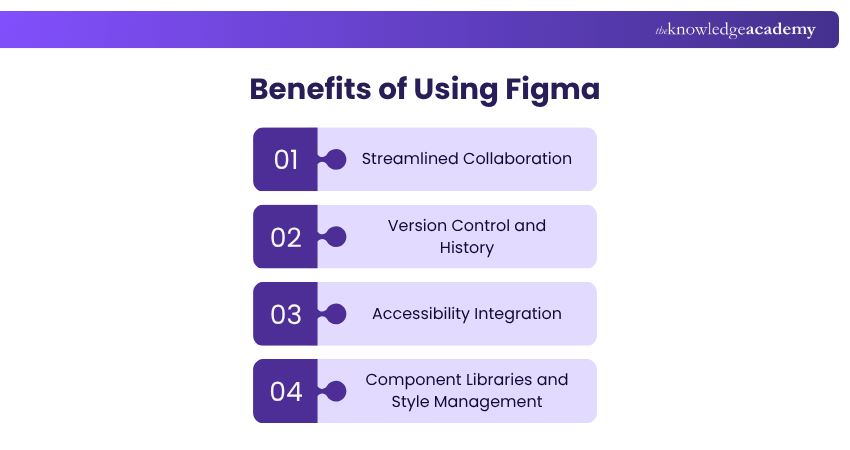
1) Streamlined Collaboration
Figma allows real-time collaboration with designers, developers, and stakeholders working together seamlessly. This improves communication, quickens feedback, and makes everyone focused on the objectives of the project.
2) Version Control and History
Monitor all the changes, experiment without barriers, and move back to previous versions without any difficulties. The history of versions makes the process of work open and contributes to effective cooperation between teams.
3) Accessibility Integration
The accessibility tools of Figma allow designers to design inclusive and user-friendly interfaces where accessibility issues are identified at early development stages and comply with accessibility guidelines.
4) Component Libraries and Style Management
Create, maintain, and recycle the design components such as buttons, forms, colors, and typography, across multiple projects. This guarantees visual cohesion as well as saving time and brand integrity.
Unlock your creativity with our comprehensive 2D Animation Course- Sign up today!
Real-time Use Cases of Figma
Figma empowers designers and teams to bring ideas to life with collaborative, cloud-based tools that simplify every step from concept to creation.
1) Designing Websites:
a) Start with wireframes and prototypes to plan the layout and structure.
b) Quickly design and refine layouts, components, and interactions.
c) Make informed design decisions to ensure the final website meets requirements.
2) Creating Mobile App Interfaces:
a) Design multiple screens and build interactive prototypes.
b) Test the user experience before development begins.
c) Ideal for UX designers to validate ideas and create intuitive apps.
3) Presenting Designs:
a) Use Figma’s presentation mode to showcase designs to clients or stakeholders.
b) Turn design files into professional, polished presentations.
c) Easily communicate design choices and collect feedback.
4) Team Collaboration:
a) Collaborate in real-time with teammates on the same project.
b) View instant updates and streamline teamwork for faster results.
c) Perfect for startups and agencies that rely on cross-functional teams.
5) Design File Management:
a) Organise projects with reusable components and shared styles.
b) Maintain brand consistency and save time across multiple designs.
c) Keep files structured, clean, and easy to navigate.
What Makes Figma Different from Adobe XD or Sketch?
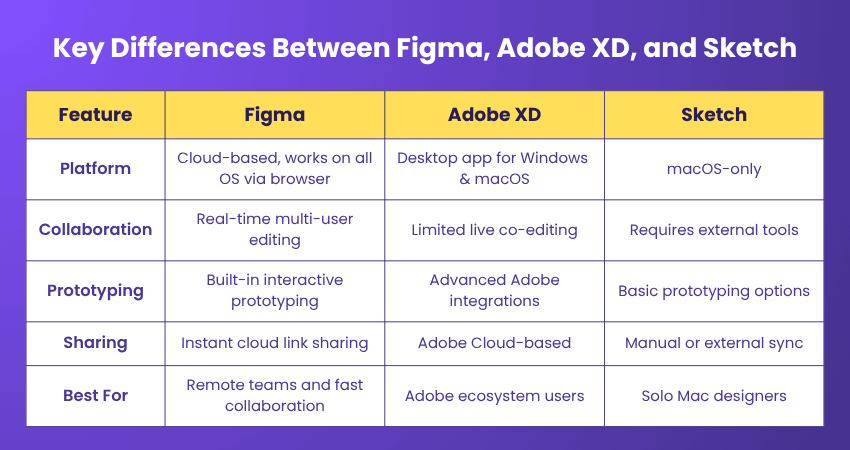
While Figma, Adobe XD, and Sketch all serve similar purposes in UI/UX design, they differ significantly in how they support collaboration, accessibility, and workflow. Here’s a quick comparison of their core features and strengths:
Gain the skills to craft mesmerising storylines in our comprehensive Animation and Design Training - Sign up now!
Conclusion
In conclusion, understanding What is Figma has transformed modern design by bridging creativity and collaboration in one unified space. It empowers individuals and teams to bring ideas to life faster, smarter, and together. Whether crafting simple interfaces or complex systems, Figma adapts seamlessly to innovation, efficiency, and the future of digital design.
Understand design principles with our Logo Design Course – Join now!
Frequently Asked Questions
Does Figma Need Coding?

No, you don't need to learn coding to use Figma. It's designed to be accessible for designers of every skill level, including those without a coding background.
What is Difference Between Figma and FigJam?
Figma is a design and prototyping tool used for user interfaces while FigJam is used as a collaborative whiteboard to brainstorm and map out ideas. FigJam allows contributors to collaborate in early stages of collaborative and creative ideation while Figma focuses on deep design.

Richard Harris


Senior Full Stack Developer and Technology Educator
Richard Harris is a highly experienced full-stack developer with deep expertise in both frontend and backend technologies. Over his 12-year career, he has built scalable web applications for startups, enterprises and government organisations. Richard’s writing combines technical depth with clear explanations, ideal for developers looking to grow in modern frameworks and tools.


 If you wish to make any changes to your course, please


