




We may not have the course you’re looking for. If you enquire or give us a call on 01344203999 and speak to our training experts, we may still be able to help with your training requirements.
Top Project Management Tools: Features and Benefits
ByThe Knowledge AcademyLast updated on: 18 August 2026
This blog covers the Top Project Management Tools, their key features, practical uses, benefits, challenges and important factors to consider when choosing the right tool.
KEY TAKEAWAYS
• Project Management tools help organise tasks, schedules, resources, and project information.• Different tools are suited to different project types, workflows, and team requirements.• Comparing tools by practical needs is more useful than simply counting their features.• The right tool should simplify project delivery without adding unnecessary complexity.
Project Management Tool Shopping List:
☐ Task boards☐ Gantt charts☐ Dashboards☐ Automations☐ Integrations☐ Time tracking☐ Resource planning
Everything looks useful. Until your team only needs three of them.
That is where choosing Project Management software gets complicated. The best tool is not determined by how many boxes it ticks, but by whether those boxes match the way your projects actually run.
With that in mind, let’s explore the Top Project Management Tools, what makes each one different, and where they fit best.
What are Project Management Tools?
Project Management tools are digital platforms that help individuals and teams plan, organise, track, and coordinate project activities. They can provide a shared place for tasks, responsibilities, deadlines, project schedules, documents, communication, and progress information.
Their capabilities vary considerably. A small team may only need a visual task board, while a complex project may require dependencies, resource planning, detailed schedules, dashboards, portfolio visibility, and reporting.

Top Project Management Tools to Consider
The best Project Management tool depends on the type of work being managed. Instead of ranking every platform from “best to worst”, the following tools are considered according to the project needs they are particularly suited to.
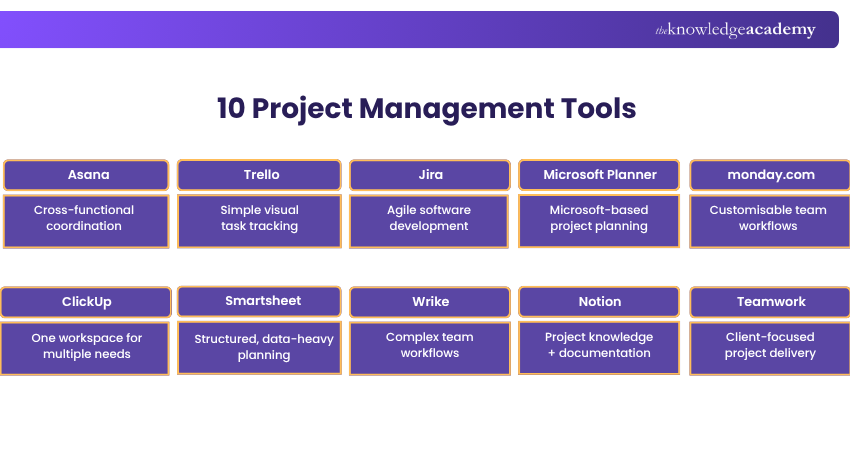
1) Asana
Asana provides a shared workspace where teams can organise projects, assign tasks, set deadlines, manage dependencies, and monitor progress. Projects can be viewed through lists, boards, calendars, timelines, and Gantt charts.
Best Suited For: Cross-functional project coordination
Standout Features: Multiple project views | Dependencies | Dashboards | Time tracking | Portfolios
2) Trello
Trello is centred around a visual board-based approach where work can be organised into cards and moved between different stages. This makes it particularly accessible for teams that want to see the status of work without navigating a highly detailed project structure.
Best Suited For: Simple projects and visual task tracking
Standout Features: Boards | Lists | Cards | Checklists | Workflow automation
3) Jira
Jira is particularly associated with software development and technical projects. It allows teams to manage issues, backlogs, workflows, sprints, and development work using approaches such as Scrum and Kanban.
Best Suited For: Agile software and development teams
Standout Features: Issue tracking | Backlogs | Sprint planning | Scrum boards | Kanban boards
4) Microsoft Planner
Microsoft Planner provides a unified work-management environment ranging from individual tasks to professional Project Management. Microsoft's current Planner combines capabilities previously associated with To Do, Planner, and Project for the web.
Its integration with the wider Microsoft environment can make it particularly relevant to organisations that already rely heavily on Microsoft 365.
Best Suited For: Microsoft 365-based workplaces
Standout Features: Task management | Plans | Scheduling | Team collaboration | Microsoft integration
5) monday.com
monday work management allows teams to structure project plans, cross-team work, requests, and repeatable processes within customisable workflows. It is designed to provide visibility into ownership, progress, and blocked work.
Best Suited For: Customisable cross-team workflows
Standout Features: Boards | Dashboards | Workflow customisation | Automations | Portfolio management options
Learn to build structured workflows, manage project activities, and improve team coordination with our monday.com Training- Sign in now!
6) ClickUp
ClickUp combines Project Management with broader work-management capabilities such as tasks, documents, dashboards, goals, and collaborative workspaces.
Its broad range of functions can suit teams that want to bring several aspects of project work into one environment rather than relying on numerous separate applications.
Best Suited For: Teams looking for an all-in-one workspace
Standout Features: Tasks | Docs | Dashboards | Goals | Time management | Whiteboards
7) Smartsheet
Smartsheet combines structured, spreadsheet-style planning with Project Management capabilities such as milestones, dependencies, resource planning, dashboards, reporting, and workflow automation.
Its grid-based structure can feel familiar to teams accustomed to spreadsheets while providing considerably more structured project controls.
Best Suited For: Structured and data-intensive projects
Standout Features: Grid view | Gantt charts | Resource management | Dashboards | Reporting
8) Wrike
Wrike provides tools for planning, resource allocation, collaboration, budgeting, reporting, and workflow management. Teams can also switch between views such as boards, tables, Gantt charts, and calendars.
Best Suited For: Larger teams and complex workflows
Standout Features: Resource bookings | Gantt charts | Budgeting | Reporting | Custom workflows
9) Notion
Notion combines project tracking with documentation, databases, and knowledge management. Teams can therefore keep project requirements, meeting notes, reference materials, plans, and tasks within the same workspace.
Best Suited For: Documentation and knowledge-heavy projects
Standout Features: Databases | Documents | Project tracking | Team knowledge | Templates
10) Teamwork
Teamwork is particularly oriented towards organisations managing projects for clients. It combines task and project planning with areas such as workload, time tracking, reporting, and client-oriented project management.
Best Suited For: Agencies and client-facing project teams
Standout Features: Client projects | Time tracking | Workload management | Reporting | Project planning
A Quick Challenge
Imagine your project could keep only one capability. Which one would be hardest to work without?
a) Task trackingb) Schedulingc) Team collaborationd) Reporting
Your answer reveals your starting priority: The right Project Management tool should support this need while also fitting your wider workflow, team, and project requirements.
How to Choose the Right Project Management Tool
The selection process should begin with your project's requirements rather than a software comparison page. Identifying what needs to be managed helps separate essential capabilities from features that simply look attractive.
1) Understand Your Project Complexity
Simple projects may only require tasks, owners, and deadlines. Larger projects can require dependencies, milestones, resource planning, budgets, risk tracking, and portfolio-level reporting.
2) Consider How Your Team Works
Think about team size, location, responsibilities, and working practices. A tool that works well for a five-person creative team may not suit a large technical project involving several departments.
3) Identify Your Essential Features
Separate must-have capabilities from nice-to-have ones. Task management, scheduling, reporting, resource management, time tracking, or client access may carry different importance depending on the project.
4) Check Integration Requirements
Consider the applications already used for communication, documents, calendars, development, finance, and other activities. Useful integrations can reduce the need to repeatedly move information between systems.
5) Consider Ease of Adoption
Sophisticated functionality provides little value if the team avoids using it. Consider how intuitive the platform is and how much configuration and training will be required.
6) Review Scalability and Cost
Look beyond today's project. Consider whether the platform can support additional users, projects, departments, and reporting requirements as organisational needs change.
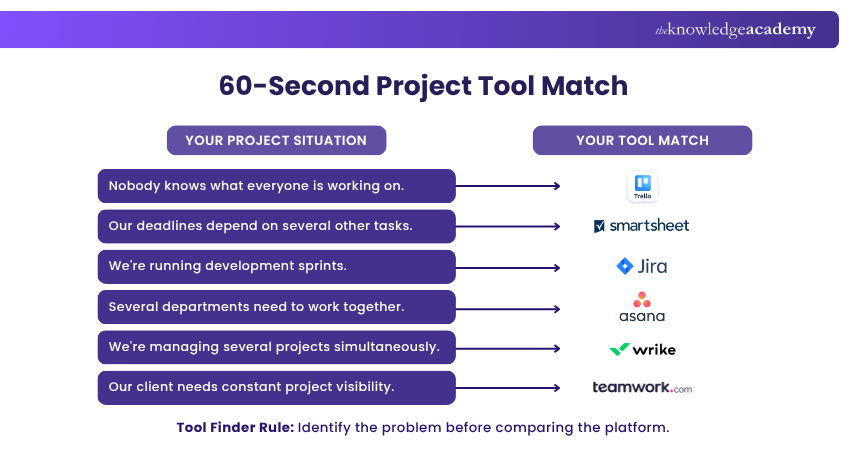
Still unsure which tool fits your project? Take the 60-second Project Tool Match below to connect your biggest project challenge with a suitable option.
Benefits and Challenges of Project Management Tools
Project Management Tools can make work easier to coordinate, but their effectiveness depends on how consistently teams use them. Here’s how the benefits and challenges can appear during the same working day.
Imagine a marketing team planning to launch a new product in six weeks. Marketing, design, content, web development, and sales are all working towards the same deadline.
Here’s what one Monday in the project could look like:
At 8:30 AM: One Dashboard, Full Picture
The Project Manager opens the dashboard and immediately sees task ownership, upcoming deadlines, and current progress without checking with each team separately.
Benefit: Centralised project visibility
By 10:15 AM: The Dashboard is Already Outdated
Several team members have not updated their tasks since Friday, leaving some of the project information incomplete or inaccurate.
Challenge: Dependence on accurate updates
At 12:30 PM: One Delay Triggers Another
If task dependencies have been configured, the Project Manager can quickly identify which related activities could be affected and respond accordingly.
Benefit: Earlier identification of project delays
By 2:45 PM: Notifications Start Piling Up
Comments, deadline reminders, task changes, and status alerts arrive throughout the afternoon, making important updates harder to spot.
Challenge: Notification overload
At 4:00 PM: Leadership Wants an Update
Instead of contacting multiple teams for progress information, the Project Manager can use the latest project data to prepare a status update.
Benefit: More efficient project reporting
By 5:15 PM: A Spreadsheet Creates a Second Version
One team member continues tracking work in a personal spreadsheet, meaning the shared platform no longer provides the complete project picture.
Challenge: Inconsistent tool adoption
Project Manager’s Tip
Keep project information updated and encourage the team to use the tool consistently. Even the best software loses value when the data behind it is incomplete or outdated.
Conclusion
Great projects rarely fall apart because of one big mistake. More often, it is the missed deadline, forgotten task or unnoticed bottleneck that causes trouble. The Top Project Management Tools help bring these moving parts into focus, giving teams the visibility and structure needed to keep projects moving forward.
Build practical skills in task management, workflow automation, collaboration, and project tracking with our ClickUp Training- Join now!

The Knowledge Academy develops accessible learning content across Project Management, IT, Cybersecurity, Data Science, Business Analysis, HR, Accounting and Finance, Leadership and Health and Safety. Its resources combine subject research with clear explanations to help professionals build practical knowledge across a wide range of disciplines.
View Detail

 If you wish to make any changes to your course, please


