


 Top Rated Course

We may not have the course you’re looking for. If you enquire or give us a call on +971 8000311193 and speak to our training experts, we may still be able to help with your training requirements.
What is RPA (Robotic Process Automation)?
Lily Turner 25 August 2026Explore RPA, its working process, key benefits, and understand how businesses use automation to handle repetitive tasks, streamline workflows and improve operational efficiency.

Training Outcomes Within Your Budget!
We ensure quality, budget-alignment, and timely delivery by our expert instructors.
Table of Contents

Key Takeaways
1. RPA uses software bots to automate repetitive and rule-based digital tasks.2. Attended, unattended, and hybrid RPA support different automation needs.3. Stable, structured, and high-volume tasks are strong candidates for RPA.4. RPA helps save time, reduce human errors, improve productivity and maintain greater consistency.5. RPA is commonly used across areas such as Finance, HR, Customer Service, IT, Healthcare and Supply Chain operations.
The first time you perform a task, you learn it.
The tenth time, you know it.
By the hundredth time, you might start wondering:
“Why am I still doing this manually?”
That question captures the purpose of Robotic Process Automation (RPA). When digital work is repetitive, predictable, and governed by clear rules, software bots can often perform those routine steps.
But knowing what not to automate is just as important as knowing what to automate. This blog unveils both sides of RPA, from how it works to where its advantages end and its limitations begin. Let's get started!
What is Robotic Process Automation (RPA)?
Think about the repeat button on a music player. Once pressed, the same track plays again without you starting it each time.
RPA brings a similar idea to certain digital tasks.
Robotic Process Automation (RPA) is a technology that uses software bots to perform repetitive, rule-based actions across digital systems. These bots can enter data, transfer information, process transactions, update records, and complete other predefined tasks.
The “robot” in RPA is not a machine sitting at a desk. It is software working within digital applications, following the instructions and rules it has been configured to execute.
The RPA Sweet Spot
RPA becomes particularly useful when a task sits at the intersection of:Repeated Often × Same Steps × Clear Rules × Digital Task = Strong RPA Potential
For example, imagine hundreds of records requiring the same information to be transferred from one system to another. The task does not necessarily need more thinking each time; it needs the same defined process carried out consistently.
That is the central idea behind RPA: take work that repeatedly says “do this again” and determine whether software can be instructed to do it instead.

How Does RPA Work?
RPA works by following a configured workflow. The bot receives a trigger, accesses the required applications or data, performs predefined actions, and produces the expected output.
A simple RPA workflow may look like this:
1) Trigger: An event starts the process, such as receiving an invoice.
2) Access: The bot opens or connects with the required system.
3) Read: It retrieves the information needed for the task.
4) Apply Rules: The bot processes the information according to predefined conditions.
5) Act: It enters data, updates records, transfers files, or performs another configured action.
6) Complete: The bot records the result or sends the process to the next stage.
If the bot encounters an exception outside its configured rules, the process can be designed to route the issue for further handling.
Watch One Task Travel Through RPA: How RPA processes an invoice from receipt to completion
Invoice Received↓Bot Reads Required Data↓Details Checked Against Rules↓System Updated↓Exception? → Send for Review↓No Exception? → Complete
RPA therefore works best when the path from input to outcome can be clearly defined.
What are the Key Components of RPA?
While RPA environments vary by platform and implementation, they commonly involve the following components:
1) RPA Bots: Bots execute the automated tasks. They can interact with applications, enter or retrieve information, move files, and follow configured rules.
2) Workflow Designer: A design or development environment is used to create the sequence of actions that the bot should perform.
3) Orchestrator: An orchestration or management system helps deploy, schedule, monitor, and manage bots and automated workflows.
4) Business Rules: Rules define the conditions the bot follows when performing a process and determine what actions should happen in predefined situations.
5) Applications and Data: Bots work with the applications, websites, files, databases, and other digital information required by the automated process.
Meet the RPA Crew
BOT → PerformsWORKFLOW → DirectsRULES → DecideSYSTEMS → ConnectORCHESTRATOR → Controls
RPA is not one bot working alone. It is a managed automation environment.
Learn to develop and integrate automated workflows with OpenSpan RPA Training - Join now!
What are the Types of RPA?
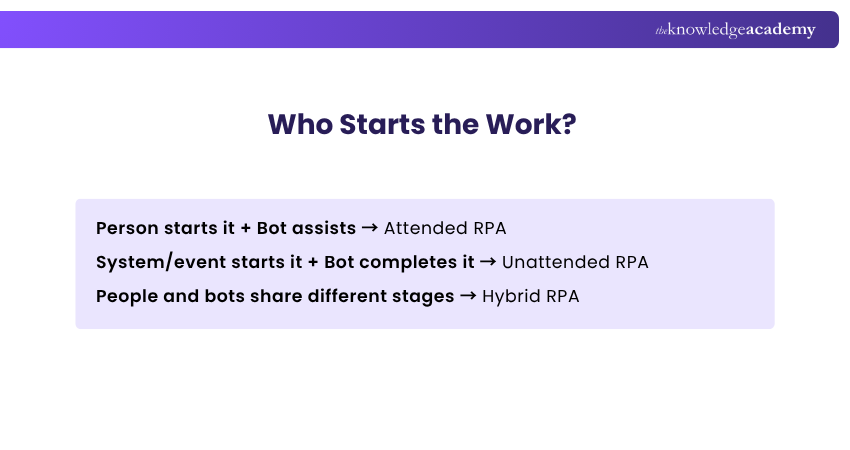
Not every automated process gives the bot the same level of independence. Some bots work beside employees, some operate in the background, and others move work between people and automation.
1) Attended RPA
Attended RPA works alongside employees. A person may trigger the bot when automation is required, while remaining involved in the wider process.
For example, a customer service employee could activate a bot to retrieve information from several systems while assisting a customer.
Think: Human leads. Bot assists.
2) Unattended RPA
Unattended RPA performs predefined processes without requiring a person to initiate every task. Bots may operate according to schedules, system events, or work queues.
It is commonly suited to predictable back-office activities that can be completed according to established rules.
Think: Process runs. Bot handles it.
3) Hybrid RPA
Hybrid RPA combines attended and unattended automation within a wider process. Some stages can run automatically, while others involve employees when interaction, judgement, approval, or exception handling is required.
For example, an unattended bot might process standard requests automatically but send an unusual case to an employee for review.
Think: Bot handles the routine. Human handles the decision.
What Tasks are Suitable for RPA?
Just because a task can be automated does not necessarily mean RPA is the right solution. RPA is generally most suitable for tasks that are:
1) Repetitive: The same actions are performed regularly with little variation between each cycle.
2) Rule-based: The task follows defined conditions, such as “If X happens, perform Y.”
3) High-volume: The activity occurs frequently enough to reduce manual effort and provide meaningful value.
4) Digital: The information and systems required to complete the task are digitally accessible.
5) Structured: The inputs, steps, and expected outputs follow a recognisable and predictable pattern.
6) Stable: The process and its underlying rules do not change frequently, making the automation easier to maintain.
Become proficient in creating intelligent workflows with Robotic Process Automation Using UiPath Training – Sign up soon!
Should a Bot Do This?
Ask five questions:
Repeated often? → Yes↓Clear rules? → Yes↓Digital inputs? → Yes↓Few unpredictable decisions? → Yes↓Process reasonably stable? → Yes
Strong RPA CandidateIf several answers are No, the process may need to be redesigned or may require a different automation approach.
Top Five Use Cases of RPA
RPA does not belong to one department. Wherever structured, rule-based digital work is repeated, there may be an opportunity for automation. Here are five common use cases:
1) Invoice Processing: RPA can extract required invoice information, enter it into relevant systems, perform predefined checks, and route exceptions for review.
2) Data Entry and Transfer: Bots can move structured information between applications, reducing repetitive copying and manual data entry.
3) Customer Service Administration: RPA can retrieve customer information, update records, route requests, and support other repetitive administrative activities behind customer interactions.
4) HR Administration: Routine activities such as updating employee records and transferring information between Human Resources (HR) systems can be automated where processes follow clear rules.
5) Report Generation: Bots can collect information from predefined sources, update files, and support the production and distribution of routine Reports.
One Technology. Five Repetitive Problems.
Invoices piling up? → RPAData copied repeatedly? → RPACustomer records need updating? → RPARoutine HR administration? → RPAReports produced repeatedly? → RPA
The common denominator is not the department. It is the repetitive process.
Advantages of RPA
RPA can do more than automate individual tasks. When applied to suitable processes, it can change how quickly, consistently, and efficiently routine work moves through an organisation.
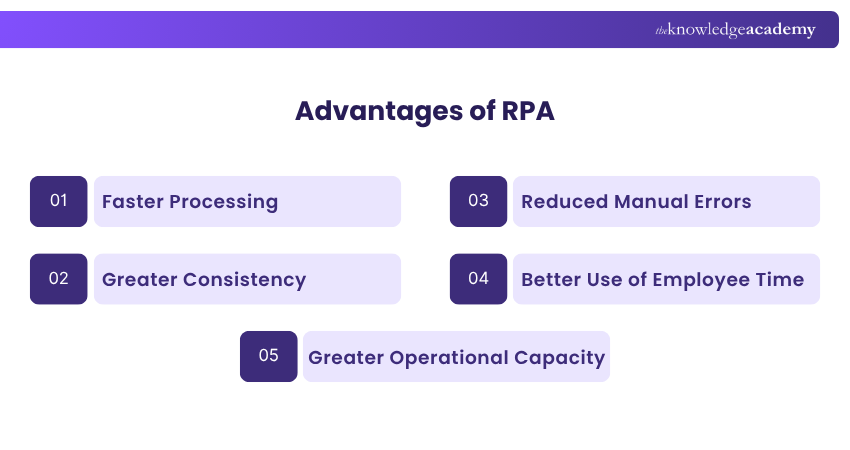
1) Faster Processing: Bots can perform repetitive digital actions quickly and can process suitable workloads without the same interruptions associated with manual execution.
2) Greater Consistency: RPA bots follow configured rules consistently, helping standardise how repetitive processes are completed.
3) Reduced Manual Errors: Automating repetitive data entry and transfer can reduce errors caused by manual copying, missed steps, or incorrect entries.
4) Better Use of Employee Time: When bots handle routine work, employees can spend more time on activities requiring judgement, communication, problem-solving, and creativity.
5) Greater Operational Capacity: Automation can help organisations process larger volumes of suitable work without increasing manual effort at the same rate.
What Changes With RPA?
Manual Repetition → Automated ExecutionRepeated Data Entry → Consistent ProcessingRoutine Workload → Greater CapacityEmployee Time on Repetition → More Time for Higher-value Work
The advantage is not simply doing more. It is changing where effort is spent.
Disadvantages of RPA
RPA can make routine work efficient, but automation also introduces technical, operational, and management challenges. Understanding these limitations helps organisations decide where RPA is genuinely suitable.
1) Limited Judgement: Traditional RPA follows predefined rules. It cannot independently handle every ambiguous, unexpected, or judgement-based situation.
2) Process Changes Can Affect Bots: Changes to interfaces, applications, data formats, or workflows can affect certain automations and create additional maintenance requirements.
3) Implementation Costs: RPA may involve costs related to software, infrastructure, development, testing, training, governance, and ongoing maintenance.
4) Scaling Can Become Complex: Managing a few automated processes differs considerably from managing bots across an organisation. Larger implementations require appropriate monitoring, ownership, security, and governance.
5) Poor Processes Remain Poor: Automating an inefficient workflow does not automatically improve its design. Organisations should examine and optimise processes before automating them.
RPA vs Traditional Automation
RPA and Traditional Automation both aim to reduce manual effort, but they typically approach automation from different layers of a digital environment.
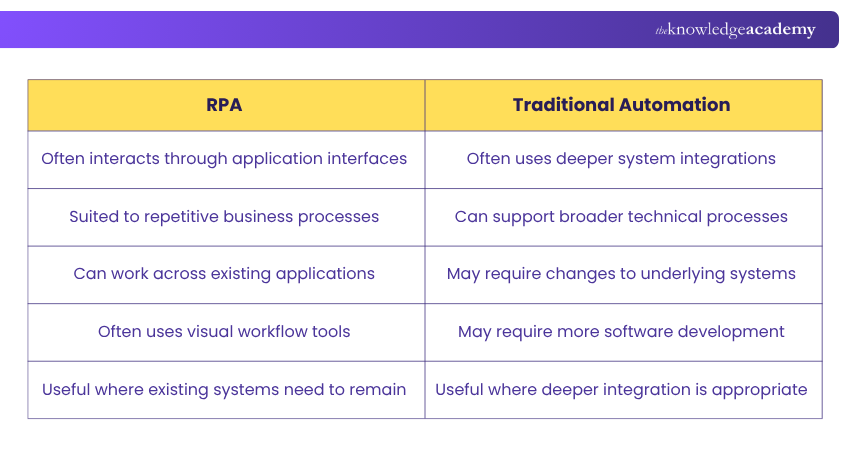
These boundaries are not absolute. Modern automation solutions can combine RPA, APIs, integrations, workflows, and other technologies depending on the process.
Think About Where Automation Happens:
1) RPA → Works across the applications people already use
2) Traditional Automation → Often works deeper within or between systems
How to Implement RPA?
RPA implementation is not simply about building a bot and switching it on. A successful implementation moves through three stages: choosing the right work, building the automation correctly, and proving that it works before scaling it.
Step 1: Identify the Process
Look for repetitive, rule-based, stable, and sufficiently high-volume tasks where automation could provide measurable value.
Step 2: Review the Existing Workflow
Map the current process and identify unnecessary steps, exceptions, bottlenecks, dependencies, and potential risks.
Step 3: Define the Automation
Specify which actions the bot will perform, what rules it will follow, and which situations require human intervention.
Step 4: Develop the Workflow
Configure the automation using an appropriate RPA platform and establish the required access to applications and information.
Step 5: Test the Bot
Test expected scenarios, exceptions, inputs, outputs, permissions, and process behaviour before deployment.
Step 6: Deploy and Monitor
Introduce the automation into the live environment and monitor its performance, exceptions, errors, and outcomes.
Step 7: Improve and Scale
Use monitoring data and feedback to refine the automation before extending RPA to additional processes.
Don't Start with the Bot
Wrong question:We have an RPA tool. What can we automate?”Better question:“Where is repetitive work consuming time without requiring human judgement?”Find the right process first. Then build the bot.
Conclusion
Successful Robotic Process Automation is not measured by how many bots an organisation deploys, but by where those bots create meaningful value. Choosing the right processes, designing automation carefully, and keeping people involved where judgement matters are key to effective implementation.
Ultimately, RPA leaves organisations with one important question: If a task follows the same rules every time, does a person need to perform every step?
Turn automation concepts into practical skills with Robot Framework Training – Join today!
Frequently Asked Questions
Does RPA Require Coding?

Many RPA platforms provide visual or low-code development capabilities. However, complex automation may require programming, scripting, integration, and other technical skills.
Is RPA the Same as AI?
No. RPA primarily executes predefined actions and rules, while Artificial Intelligence (AI) can support capabilities such as recognising patterns, interpreting information, classification, prediction, and language processing.
Which Tasks Should not be Automated With RPA?
Tasks involving frequent changes, unclear rules, substantial human judgement, unpredictable exceptions, or poorly designed processes may not be suitable for straightforward RPA.
Can RPA Replace Human Employees?
RPA can automate specific repetitive tasks, but people remain important for judgement, problem-solving, communication, exceptions, governance, and process improvement.

Lily Turner


Senior AI/ML Engineer and Data Science Author
Lily Turner is a data science professional with over 10 years of experience in artificial intelligence, machine learning, and big data analytics. Her work bridges academic research and industry innovation, with a focus on solving real-world problems using data-driven approaches. Lily’s content empowers aspiring data scientists to build practical, scalable models using the latest tools and techniques.
View Detail

 If you wish to make any changes to your course, please


