


 Top Rated Course

We may not have the course you’re looking for. If you enquire or give us a call on + 1-866 272 8822 and speak to our training experts, we may still be able to help with your training requirements.
18 Best Animation Tools to Bring Your Ideas to Life
Richard Harris 15 July 2026Explore the 18 best Animation Tools for beginners and professionals. Discover top 2D and 3D software like Blender, Maya, and Adobe Animate to create stunning visuals. These tools simplify animation, enhance creativity, and help you design engaging content for films, games, and digital storytelling. Read to learn more!

Training Outcomes Within Your Budget!
We ensure quality, budget-alignment, and timely delivery by our expert instructors.
Table of Contents

Animation has become a core part of industries such as entertainment, marketing, and education. It serves as a visual language that connects people through creativity, emotion, and storytelling. By transforming ideas into motion, animation allows brands, artists, and educators to engage audiences in more meaningful ways.
Whether you are an experienced animator or a beginner exploring this creative field, using the right Animation Tools can make a major difference in quality and efficiency. This blog highlights the Top 18 Best Animation Tools designed to meet diverse needs, helping you choose the ideal platform to bring your creative vision to life with precision and impact.
Table of Contents
1) What are Animation Tools?
2) Top 18 Best Animation Tools
a) Adobe Animate
b) Toon Boom Harmony
c) Blender
d) Powtoon
e) OpenToonz
f) Maya
g) Pencil2D
h) Animaker
i) Vyond
j) Houdini Animation
3) Choosing the Right Animation Tool
4) Are Cloud-based Animation Tools Better Than Desktop Software?
5) Conclusion
What are Animation Tools?
Animation Tools are digital software applications that allow artists and designers to create moving images or visual effects. These tools help in designing characters, scenes, and transitions that bring static visuals to life through motion.
Some animation software is simple and beginner-friendly, while others offer advanced features for professional animators. Depending on your project needs, you can choose tools specialised for different animation styles such as 2D, 3D, or stop-motion. Whether it is hand-drawn motion, character rigging, or cinematic effects, Animation Tools make it possible to turn creative ideas into engaging visuals.

Top 18 Best Animation Tools
These Animation Tools, from the free to the premium versions, form the backbone of the animator's arsenal. Each possesses a unique charm, offering many features that cater to a spectrum of needs, from the budding enthusiast to the seasoned professional. Let's discuss this vibrant world of such tools, where the magic of motion finds its canvas.
Adobe Animate
Adobe Animate is a multifaceted Animation Tool that seamlessly marries illustration. Renowned for its versatility, it empowers artists, animators, and designers to craft captivating Animations, interactive content, games, and more. Whether your ambition lies in crafting intricate character or designing captivating web Animations, Adobe Animate opens doors to endless possibilities.
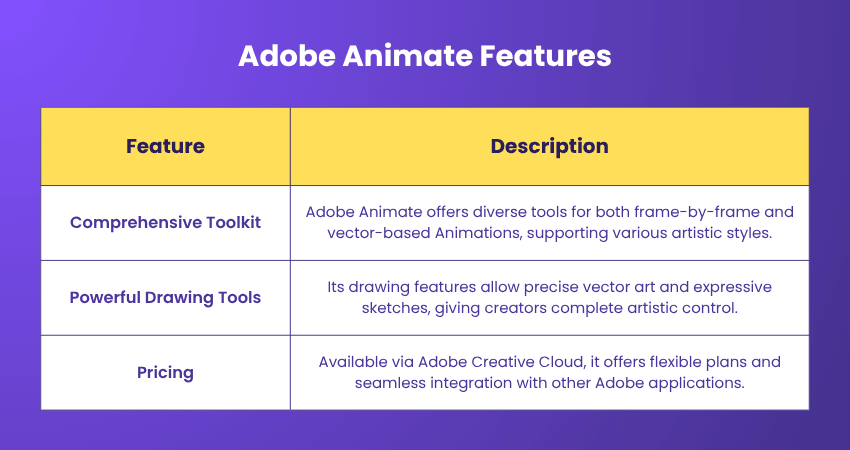
Features:
a) Comprehensive Toolkit: Adobe Animate provides a rich arsenal of tools to suit various Animation styles. This software caters to various artistic approaches, from classic frame-by-frame Animation to modern vector-based Animations.
b) Powerful Drawing Tools: The drawing tools in Adobe Animate are akin to a virtuoso's brushstrokes. Be it freehand sketching or precise vector art; the toolset ensures that every stroke is imbued with artistic expression.
c) Pricing: Adobe Animate is available through Adobe's Creative Cloud subscription service, offering flexible plans tailored to different needs. This subscription model grants access to many Adobe tools, enabling creators to integrate their Animation projects with other Adobe software seamlessly.
Toon Boom Harmony
Toon Boom Harmony stands as a pinnacle of Animation software, revered by professionals and enthusiasts alike. It provides a comprehensive platform that caters to a wide range of Animation styles, from traditional 2D Animation to advanced digital creations. Pioneering innovation in Animation, Toon Boom Harmony empowers artists, animators, and studios to craft Animations that transcend boundaries and captivate audiences.
Features:
a) Versatile Animation Styles: Whether you're inclined towards hand-drawn Animations or digital creations, Toon Boom Harmony accommodates diverse Animation styles, making it a versatile canvas for artists to express themselves.
b) Frame-by-frame Excellence: For those who appreciate the traditional artistry of frame-by-frame Animation, Toon Boom Harmony offers tools that maintain the integrity of this approach while incorporating modern efficiencies.
c) Pricing: Toon Boom Harmony offers various pricing tiers tailored to different users, from freelancers to large studios. The pricing model reflects the software's comprehensive features and its value to professionals in the Animation industry.
Learn new specialised skills with our Animation and Design Training – Join now!
Blender
Blender is a powerhouse of 3D creation, an open-source gem that empowers artists, designers, and animators to shape entire worlds within a digital realm. Beyond its awe-inspiring Animation capabilities, Blender seamlessly integrates features for 3D modelling, sculpting, texturing, rendering, and more.
It's also a fantastic tool for Blender Architecture, enabling architects to visualise and design complex structures. It's a digital playground where the boundaries of creativity are limited only by the mind's eye.
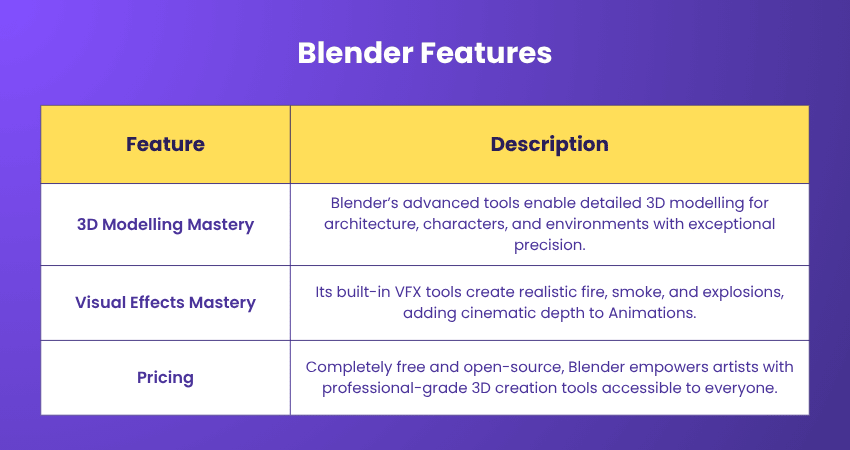
Features:
a) 3D Modelling Mastery: Blender's robust suite of 3D modelling tools facilitates the creation of complex structures, characters, and environments. Blender offers various modelling tools, from intricate architecture to organic character designs.
b) Visual Effects Mastery: Blender's integrated visual effects tools let creators harness the magic of explosions, fire, smoke, and more. The realism achieved in these effects elevates Animations to cinematic levels.
c) Pricing: Blender's most captivating feature is its price tag: it's completely free. This open-source software defies the notion that powerful tools must come cheaply. It embodies the spirit of artistic empowerment by making professional-grade Animation and 3D creation accessible to all.
Powtoon
Powtoon is an online Animation platform that offers a unique blend of Animation and presentation tools. It provides a user-friendly canvas where creators can combine Animation, storytelling, and design elements to craft visually appealing and informative content.
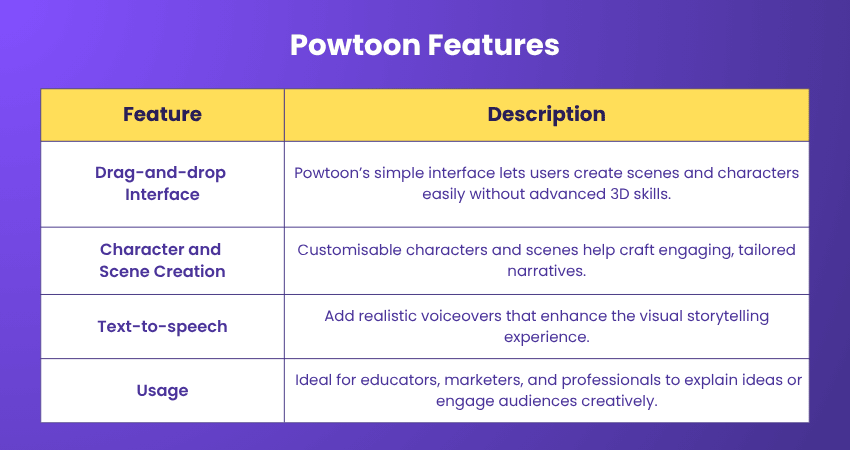
Features:
a) Drag-and-drop Interface: The intuitive drag-and-drop interface simplifies the process of assembling scenes, characters, and elements, enabling creators to produce Animations without extensive 3D Animation Skills.
b) Character and Scene Creation: Powtoon offers customisable characters and scenes that cater to diverse narratives and messaging requirements, allowing users to tailor Animations to their specific needs.
c) Text-to-speech: One of Powtoon's standout features is its text-to-speech functionality, which allows creators to add voiceovers to Animations, providing a voice that complements the visual narrative.
d) Usage: Powtoon caters to an array of users, including educators, marketers, business professionals, and content creators. Its versatile features make it suitable for a variety of applications, from explaining complex concepts to captivating an audience's attention.
OpenToonz
OpenToonz is a powerful open-source Animation software widely used for both professional and personal projects. Originally developed by Digital Video and customised by Studio Ghibli, it offers an impressive blend of traditional drawing tools and modern digital features.
Features:
a) Hybrid workflow: OpenToonz supports both hand-drawn and digital workflows, making it suitable for animators who prefer a traditional animation style with digital precision.
b) Effects and compositing: The software includes a wide range of built-in effects and compositing tools to enhance animation quality.
c) Pricing: OpenToonz is completely free and open-source, encouraging artists to explore professional-grade animation capabilities without any cost barriers.
Maya
Maya, developed by Autodesk, stands as a powerhouse of 3D Animation, modelling, and rendering. It's revered across industries, from film and gaming to architecture, design, and even projects like 3D Printed Houses, for its unparalleled versatility and extensive toolset. Maya empowers artists, designers, and animators to bring their creative visions to life through immersive 3D storytelling.
Features:
a) Versatile 3D modelling: Maya's robust 3D modelling tools cater to an array of projects. Artists can shape intricate characters, build architectural wonders, or craft fantastical landscapes with precision and artistic flair.
b) Advanced Aaimation: The software's Animation capabilities extend beyond basic movements. Maya's rigging and Animation Tools enable creators to imbue characters and objects with lifelike motion, emotion, and personality.
c) Visual effects excellence: rom explosions and simulations to complex particle effects, Maya's visual effects toolkit allows artists to create awe-inspiring visuals that enrich the narrative and immerse viewers.
d) Pricing: Maya offers both monthFly and annual subscription options, tailored to a range of users from freelancers to studios. The software's cost reflects its extensive capabilities and its pivotal role in professional 3D creation.
Pencil2D
Pencil2D is a 2D Animation software that captures the essence of traditional Animation while harnessing the advantages of digital technology. Its minimalist interface and intuitive tools make it a perfect choice for artists, beginners, and anyone seeking a straightforward platform to create Animations with the charm of hand-drawn art.

Features:
a) Hand-drawn Aesthetic: The software's focus on hand-drawn Animation gives it a distinct artistic charm. Each frame becomes a canvas for artists to craft their characters, scenes, and stories with a personal touch.
b) Frame-by-frame Animation: Pencil2D's frame-by-frame approach enables creators to construct Animations one drawing at a time. This technique resonates with the traditional method of Animation, allowing for precise control and a tangible connection to the craft.
c) Pricing: Pencil2D embraces the philosophy of accessibility. As open-source software, it's freely available for download and use by anyone interested in exploring the world of Animation.
Animaker
Animaker is an online Animation platform designed to simplify the creation of animated videos for a wide range of purposes. From marketing and educational content to presentations and explainer videos, Animaker provides a dynamic canvas where users can bring their ideas to life through Animation and Motion Graphics.
Features:
a) Template Library: Animaker offers an extensive library of pre-designed templates, catering to diverse themes and styles. These templates expedite the creation process, making it accessible to users with varying levels of design experience.
b) Drag-and-drop interface: The intuitive drag-and-drop interface empowers users to assemble scenes, characters, and elements seamlessly, without requiring in-depth 3D Animation Skills.
c) Data Visualisation: Animaker excels at translating data and statistics into engaging animated infographics and visualisations, making complex information more comprehensible.
d) Usage: Animaker is utilised by a diverse range of users, including marketers, educators, content creators, and businesses. Its versatility and user-friendly interface make it an asset for conveying messages effectively through animated content.
Our Motion Graphics Course is designed to transform you into a Motion Graphics pro – Join now!
Vyond
Vyond, previously known as GoAnimate, is a cloud-based Animation platform that caters specifically to businesses and professionals. It provides a comprehensive toolkit for creating animated content that effectively communicates ideas, simplifies concepts, and engages audiences across various platforms.
Features:
a) Customisable Characters: Vyond offers a diverse range of customisable characters, allowing users to create avatars that resonate with their target audience and fit the narrative.
b) Scene Creation: The platform provides an extensive library of scenes and backgrounds, enabling users to craft Animations within a context that enhances the storytelling.
c) Music and Sound Integration: The platform offers an array of sound effects and music tracks, enabling users to enhance their Animations with audio dimensions that captivate the auditory senses.
d) Export and Sharing: Vyond facilitates the export of Animations in multiple formats, ensuring that the animated content is compatible with a variety of platforms and devices.
e) Usage: Vyond is widely adopted by professionals, educators, and businesses seeking to streamline their communication efforts. It finds applications in marketing campaigns, internal training, product presentations, and more.
Houdini Animation
Houdini Animation is a high-end 3D Animation software known for its procedural generation and powerful visual effects capabilities. Used extensively in film, gaming, and motion graphics, it allows animators to create complex simulations and realistic animations with precision.
Features:
a) Procedural Workflow: Houdini’s node-based system enables artists to build dynamic, reusable effects and animations efficiently.
b) Advanced Simulations: It offers exceptional tools for particle effects, fluids, fire, smoke, and destruction sequences.
c) Pricing: Houdini provides both commercial and free versions, including Houdini Apprentice for non-commercial use, giving learners access to professional tools at no cost.
FlipaClip
FlipaClip redefines Animation by making it accessible to anyone with a mobile device. With a user-friendly interface and a rich set of features, it empowers users to create Animations that range from simple sketches to intricate narratives, all within the palm of their hand.
Features:
a) Intuitive Drawing Tools: FlipaClip offers an array of intuitive drawing tools and brushes, allowing users to bring their artistic visions to life with precision and creativity.
b) Frame Management: The app's frame management system ensures that each frame flows seamlessly into the next, resulting in Animations that are smooth and captivating.
c) Usage: FlipaClip caters to a diverse audience, from beginners experimenting with Animation to experienced artists seeking a convenient way to sketch and animate while on the go. It's particularly popular among young creators exploring the world of digital art.
Krita
Krita is a free and open-source digital art software that has expanded its capabilities to encompass Animation. Its user-friendly interface, rich toolset, and commitment to the open-source community make it a powerful choice for artists, illustrators, and animators seeking a platform to express their visions.
Features:
a) Effects and Filters: Krita's plethora of effects and filters can be applied to Animations, adding dynamism and enhancing the overall visual appeal.
b) Audio Integration: While primarily an Animation Tool, Krita also supports audio integration. This enables creators to enhance their Animations with accompanying sound effects, music, or dialogue.
c) Export and Sharing: Krita facilitates the export of Animations in multiple formats, ensuring compatibility across various platforms and audiences.
d) Usage: Krita caters to a broad spectrum of artists – from digital painters and illustrators seeking to explore Animation to animators who appreciate its familiar toolset and powerful features.
Stop Motion Studio
Stop Motion Studio is a user-friendly software designed to facilitate the creation of stop-motion Animations. It offers a range of features that enable users to bring inanimate objects to life, capturing each incremental change and crafting mesmerising narratives frame by frame.
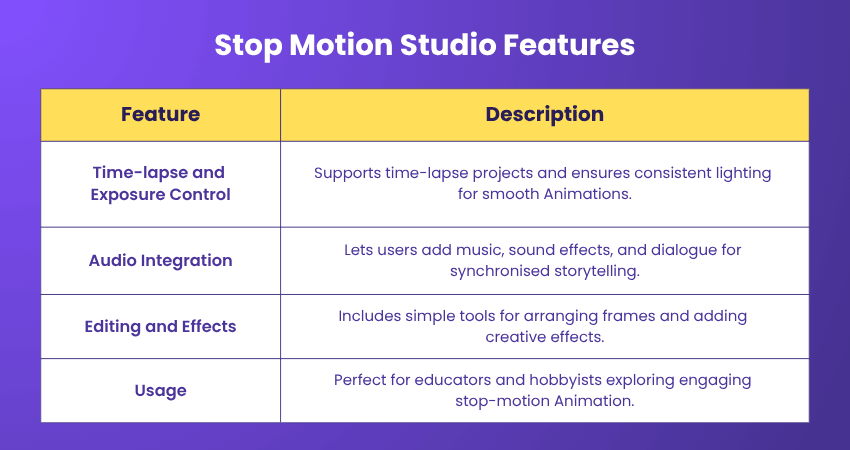
Features:
a) Time-lapse and Exposure Control: The software supports time-lapse photography, making it versatile for various creative projects. Exposure control ensures Animations appear consistent under different lighting conditions.
b) Audio Integration: Stop Motion Studio recognises the role of sound in enhancing Animation. Users can integrate audio effects, music, and dialogue to synchronise with their creations.
c) Editing and Effects: Stop Motion Studio offers basic editing tools to arrange frames and add effects, allowing creators to refine their Animations and infuse them with creative flair.
d) Usage: Stop Motion Studio caters to a diverse audience – from educators looking to engage students with hands-on Animation projects to amateur enthusiasts experimenting with the magic of stop-motion.
Synfig Studio
Synfig Studio is a vector-based Animation software that embraces the philosophy of open-source creativity. It enables artists and enthusiasts to craft Animations using a combination of vector graphics and advanced techniques, resulting in smooth, scalable, and visually engaging motion.
Features:
a) Vector-based Magic: The heart of Synfig Studio lies in its vector-based approach. This allows animators to create images using mathematical equations, ensuring that images remain crisp and clear, no matter how much they're scaled.
b) Export Formats: Synfig Studio supports various export formats, from video files to image sequences, making it compatible with a range of platforms and devices.
c) Pricing: Synfig Studio is a testament to the open-source movement. It's freely available for artists, animators, and enthusiasts to download, use, and contribute to. This commitment to accessibility embodies the philosophy that creative tools should be accessible to all.
Moho Animation Studio
Moho Animation Studio, also known as Anime Studio, is a comprehensive software designed for creating 2D Animations, particularly focusing on character Animation. Developed by Smith Micro, this software offers a range of tools that simplify the Animation process, making it an ideal choice for both beginners and experienced animators.
Features:
a) Rigging and Character Animation: Moho Animation Studio excels in character Animation, offering an advanced rigging system that enables users to create dynamic movements with ease. Rigging allows animators to define skeletal structures, making characters flexible and enabling natural motion.
b) Lip-Syncing and Facial Animation: Bringing characters to life goes beyond movement; it involves emotions and speech. Moho Animation Studio offers lip-syncing and facial Animation Tools that synchronise character expressions and speech for a more realistic and engaging experience.
c) Vector-based Artwork: Moho Animation Studio's vector-based approach ensures that designs and characters remain crisp and scalable, even when Animations are resized or transformed.
d) Pricing: Moho Animation Studio offers different versions tailored to various user needs. There are both Debut and Pro versions, each with a corresponding price point. The Pro version, equipped with advanced features, is ideal for professional animators seeking more intricate control over their creations.
Procreate
Procreate is an intuitive and versatile drawing and animation app designed specifically for iPad users. It empowers artists to sketch, illustrate, and animate seamlessly using natural brush strokes and frame-by-frame animation features.
Features:
a) Ease of use: With a clean interface and responsive Apple Pencil support, Procreate makes digital animation feel natural and fluid.
b) Animation Assist: The built-in Animation Assist feature allows users to create looping animations and storyboards quickly.
c) Pricing: Procreate is available as a one-time purchase on the App Store, offering excellent value for professional artists and beginners alike.
Cinema 4D
Cinema 4D is a professional-grade 3D Animation, modelling, and rendering software developed by Maxon. Renowned for its user-friendly interface and comprehensive toolset, it caters to artists, designers, and animators seeking to craft immersive 3D visuals for films, games, architecture, and more.
Features:
a) Intuitive Interface: Cinema 4D's interface strikes a harmonious balance between functionality and user-friendliness. Its intuitive layout makes navigation effortless, allowing artists to focus on creativity rather than technical complexities.
b) 3D Modelling Excellence: From intricate architectural structures to organic character designs, Cinema 4D's modelling tools offer versatility and precision. Its parametric and polygonal modelling capabilities accommodate various creative visions.
c) Integration with Adobe Products: Cinema 4D seamlessly integrates with Adobe products, facilitating a smooth workflow for those who use both software suites. This integration enhances efficiency and productivity.
d) 3D Printing Support: For artists exploring the realm of 3D printing, Cinema 4D offers tools for creating models that are optimised for printing, ensuring that the transition from virtual to physical is seamless.
e) Pricing: Cinema 4D offers various pricing options, including monthly and annual subscriptions. These options cater to a range of user needs, from freelancers to large studios. Its cost reflects the comprehensive feature set and its value in professional 3D creation.
Dragonframe
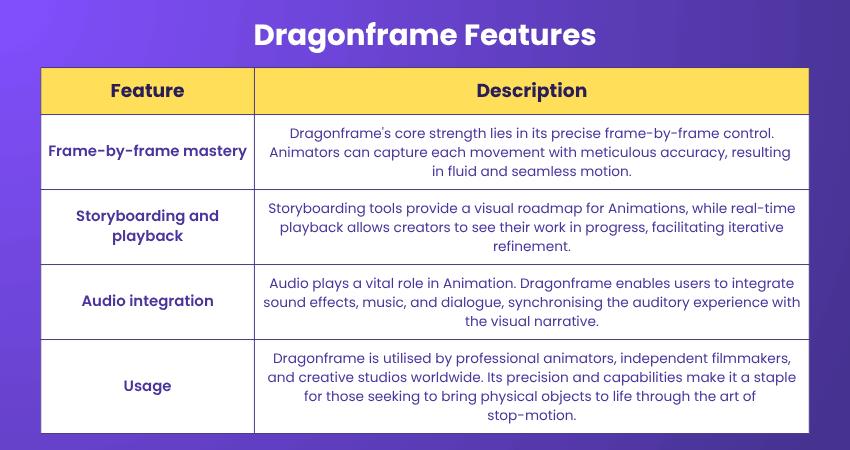
Dragonframe is a dedicated stop-motion Animation Tool that elevates the art of animating physical objects into a refined craft. It provides animators with a comprehensive toolkit to orchestrate movement, lighting, and effects, transforming individual frames into a mesmerising animated tapestry.
Features:
a) Drag-and-drop interface: The intuitive drag-and-drop interface simplifies the process of assembling scenes, characters, and elements, enabling creators to produce Animations without extensive 3D Animation Skills.
b) Character and scene creation: Powtoon offers customisable characters and scenes that cater to diverse narratives and messaging requirements, allowing users to tailor Animations to their specific needs.
c) Text-to-speech: One of Powtoon's standout features is its text-to-speech functionality, which allows creators to add voiceovers to Animations, providing a voice that complements the visual narrative.
d) Usage: Powtoon caters to an array of users, including educators, marketers, business professionals, and content creators. Its versatile features make it suitable for a variety of applications, from explaining complex concepts to captivating an audience's attention.
Ready to bring your drawings to life? Elevate your skills with our comprehensive 2D Animation Course.
Choosing the Right Animation Tool
Selecting the right Animation Tool depends on your goals, skills, and project type. Beginners can explore easy tools like Pencil2D, Animaker, or FlipaClip, while professionals often prefer Blender, Maya, or Houdini for advanced 3D work.
Artists focusing on illustration may choose Procreate or Krita, whereas OpenToonz, Synfig Studio, and Toon Boom Harmony suit those seeking open-source or studio-level capabilities. Always test free versions or trials to find what fits your creative style and workflow best.
Are Cloud-based Animation Tools Better Than Desktop Software?
Cloud-based Animation Tools offer convenience, real-time collaboration, and accessibility from any device. They are ideal for teams working remotely or creators who prefer automatic updates and secure online storage.
Desktop software, on the other hand, provides more control, speed, and advanced rendering capabilities. It is often preferred by professional studios needing powerful features, offline access, and integration with high-end hardware.
Conclusion
We hope this blog helped you explore the best Animation Tools and understand their unique capabilities. From detailed character rigging to stunning visual effects, these tools capture the essence of bringing art to life through motion.
Each software listed offers distinct features, accessibility, and pricing to suit different creative needs. Before choosing one, consider your skill level, project goals, and budget to find the tool that complements your animation style and enhances your creative process.
Want to create compelling, interactive e-learning courses that captivate your audience? Our Articulate Storyline Training is your ticket to becoming an e-learning pro.
Frequently Asked Questions
What is the Difference Between Motion Graphics and Animation Tools?

Motion graphics focus on moving text, shapes, and graphics to communicate ideas visually. Animation Tools, however, create full character movements and scenes, allowing artists to build complex storytelling experiences that go beyond simple motion design or visual effects.
How do I Troubleshoot Common Issues in Animation Software?
Start by updating your software and checking system compatibility. Clear cache files, adjust performance settings, and ensure enough memory is available. For persistent problems, reinstall the program or consult community forums and official support for detailed troubleshooting assistance.

Richard Harris


Senior Full Stack Developer and Technology Educator
Richard Harris is a highly experienced full-stack developer with deep expertise in both frontend and backend technologies. Over his 12-year career, he has built scalable web applications for startups, enterprises and government organisations. Richard’s writing combines technical depth with clear explanations, ideal for developers looking to grow in modern frameworks and tools.


 If you wish to make any changes to your course, please


