




We may not have the course you’re looking for. If you enquire or give us a call on +91-181-5047001 and speak to our training experts, we may still be able to help with your training requirements.
What are the Advantages and Disadvantages of Microsoft Access
ByNilotpal SarmahLast updated on: 18 September 2026
Microsoft Access is a database management system from Microsoft that combines a graphical interface with relational database capabilities. It allows users to easily create, manage, and share databases without requiring advanced programming skills.

Microsoft Access is one of the most prevalent database management systems across the world, known for providing a range of features for managing data. Understanding the advantages and disadvantages of Microsoft Access can help users make informed decisions when considering this software for their data management needs. It combines ease of use with clear limits, making it best suited for smaller projects while larger enterprises may require more robust solutions. Read more to find out!
What are the Advantages of Microsoft Access?
This section of the blog will delve deeper into five key advantages of Microsoft Access. Let’s learn about them below:
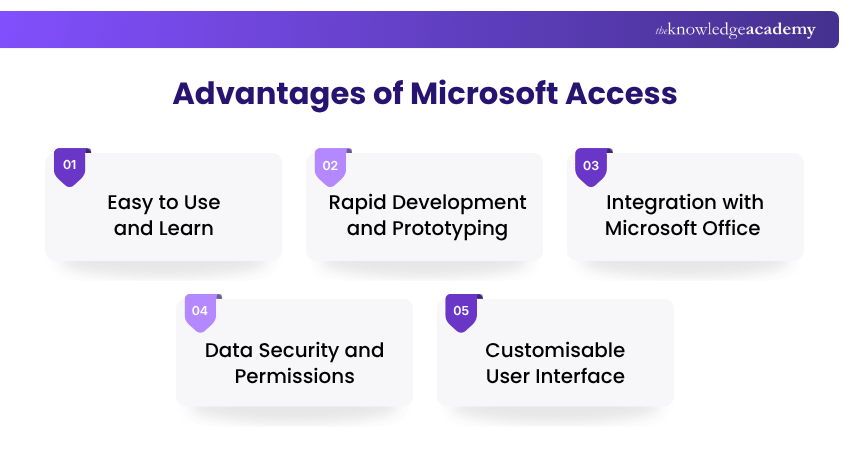
1) Easy to Use and Learn
One of the key advantages of using Microsoft Access is that it is easy to use and learn. Access has gained popularity for its user-friendly interface, making it accessible to users with little or no programming experience. The software provides a familiar environment that resembles other Microsoft Office applications, allowing users to navigate and interact with the system comfortably. Its intuitive design and visual tools make it easy to create databases, tables, and queries without the need for extensive technical knowledge.

2) Rapid Development and Prototyping
One of the key advantages of Microsoft Access is its ability to facilitate rapid development and prototyping of database applications. With its drag-and-drop functionality and visual design tools, users can quickly create forms, reports, and other database objects.
This feature is particularly beneficial for small-scale projects or when time is of the essence. By leveraging Microsoft Access development, users can streamline the creation process, customise database functionalities, and make iterative improvements efficiently, ensuring faster and more effective application deployment
3) Integration with Microsoft Office
Microsoft Access seamlessly integrates with other Microsoft Office applications, such as Excel, Word, and PowerPoint. This integration streamlines data management and analysis by enabling users to import and export data between Access and these applications.
For example, data from an Excel spreadsheet can be easily imported into an Access database for further analysis or manipulation. Similarly, Access reports can be exported to Word or PowerPoint for professional presentations or documentation purposes. This interoperability enhances productivity and ensures a smooth workflow within the Microsoft Office ecosystem.
4) Data Security and Permissions
Maintaining data security is of utmost importance for any organisation. Microsoft Access provides robust security features that allow users to control access to their databases and protect sensitive information. The software supports user-level security, enabling administrators to assign different levels of permissions to individuals or groups.
By defining specific user roles and access privileges, administrators can ensure that only authorised personnel can modify or view sensitive data. This feature enhances data confidentiality, integrity, and compliance with privacy regulations.
Make everyday tasks feel effortless and work smarter across every Office app with the Microsoft Office Training – Join now!
5) Customisable User Interface
Microsoft Access offers a high level of flexibility when it comes to designing the interface of a database application. Users can customise forms, create reports in Microsoft Access, and create menus to create an intuitive and tailored experience. Through a variety of design tools and options, users can adjust the appearance, layout, and functionality of database objects to meet their specific requirements.
This customisation capability enhances user satisfaction and improves overall usability by providing an interface that aligns with the organisation's branding and workflow.
Trainer’s Insight
Microsoft Access can be particularly useful when the priority is to build and modify a functional database application quickly. Its visual development tools allow users to create forms, queries and reports without requiring the infrastructure typically associated with larger database systems.
What are the Disadvantages of Microsoft Access?
Now, we will explore the five disadvantages of Microsoft Access, highlighting Microsoft Access database limitations that users should be aware of:
1) Limited Scalability and Performance
One of the key disadvantages of using Microsoft Access is its limited scalability and performance. While Access is suitable for small to medium-sized databases, it may encounter limitations in terms of scalability and performance when dealing with large, complex datasets.
Microsoft Access databases are capped at a maximum size of 2GB, which restricts scalability for growing datasets. As the database size increases and the volume of data grows, Access may exhibit slower response times and reduced overall performance. This can impact the efficiency of data retrieval, processing, and analysis. For larger-scale projects or organisations with extensive data requirements, a more robust database management system like Microsoft SQL Server or Oracle may be a better choice.
Bonus Tip
Don’t wait for an Access database to become difficult to manage before evaluating its growth. Monitor database size, response times and the number of simultaneous users as requirements increase. This can help identify when optimisation or migration to a more scalable database solution should be considered.
2) Relational Database Constraints
Microsoft Access has certain limitations when it comes to handling complex relationships between tables. While it supports basic relational database features, it may not be ideal for scenarios that require advanced relationship management or complex querying.
For instance, if you need to create intricate relationships with multiple tables or implement advanced join operations, you may encounter challenges in Microsoft Access. In such cases, a more powerful database system designed for handling complex relationships might be more suitable.
3) Concurrent User Limitations
Microsoft Access has inherent limitations on the number of concurrent users who can access a database simultaneously. While it can handle a moderate number of users, problems may arise when multiple users attempt to access and modify data concurrently. Performance and stability issues may occur, leading to potential data conflicts or inconsistencies.
This limitation can hinder collaboration and the smooth operation of database-driven applications in larger teams or organisations. If you anticipate a significant number of concurrent users, it is advisable to consider a more robust database solution.
4) Lack of Version Control and Collaboration Features
Microsoft Access lacks built-in version control and collaboration features, which can be crucial in scenarios where multiple users need to work on the same database simultaneously or track changes made by different individuals.
Without proper version control mechanisms, it becomes challenging to manage revisions, ensure data integrity, and prevent conflicting updates. Collaborative projects may require external tools or manual processes to address these limitations effectively.
Learn essential document formatting skills with Microsoft Word Course - Join now!
5) Compatibility and Portability Issues
Microsoft Access databases are primarily designed for the Windows operating system. Consequently, compatibility and portability issues may arise when attempting to use Access databases on non-Windows platforms. Certain Access-specific features or functionalities may not function as expected, limiting the accessibility and portability of the database.
If cross-platform compatibility is a critical requirement, it is advisable to explore alternatives to Microsoft Access that offer greater flexibility in terms of operating system compatibility.
Keep This in Mind
Microsoft Access can be a practical choice when ease of use, rapid database development and integration with Microsoft applications are priorities. However, its suitability depends on more than your immediate requirements. Consider expected data growth, the number of simultaneous users, performance needs and platform requirements before choosing it for long-term use.

Nilotpal Sarmah is a Senior Content Writer with 11+ years of overall experience spanning engineering, operations and content development. His technical knowledge and extensive writing experience enable him to simplify specialised topics across IT and Tech, Business Skills, Project Management, Health and Safety, and ISO and Compliance.
View Detail

 If you wish to make any changes to your course, please


