




We may not have the course you’re looking for. If you enquire or give us a call on 01344203999 and speak to our training experts, we may still be able to help with your training requirements.
Top Benefits of Microsoft SharePoint
ByGaurav KalitaLast updated on: 17 September 2026
Explore the top Microsoft SharePoint Benefits and how they support productivity, knowledge sharing, document management and connected workplace collaboration.
Report_Final.docx
Report_Final2.docx
Report_FINAL_Approved.docx
Report_FINAL_Approved_New.docx
Which one would you open?
Managing documents becomes complicated when teams lack a clear, organised system. Microsoft SharePoint helps tackle this problem by centralising content, supporting version management and making information easier to find and share.
But better document management is only one piece of the puzzle. Let’s uncover the key Benefits of Microsoft SharePoint and why organisations use it to create more connected ways of working.
What is Microsoft SharePoint?
Microsoft SharePoint is a content management and collaboration platform within the Microsoft 365 ecosystem. Organisations can use it to create sites, manage documents, share information, organise content, and support internal communication.
SharePoint also works with Microsoft tools such as Teams, OneDrive, Outlook, and Power Automate. This connected environment allows information, files, and processes to move more easily between different workplace activities.
Remember!
SharePoint is more than a place to store files. Its wider value comes from connecting content, people, permissions, processes, and workplace knowledge in one structured environment.

Benefits of Microsoft SharePoint
Microsoft SharePoint offers benefits across collaboration, document management, productivity, information access, and business processes. The following benefits show why organisations use SharePoint as part of their wider digital workplace:
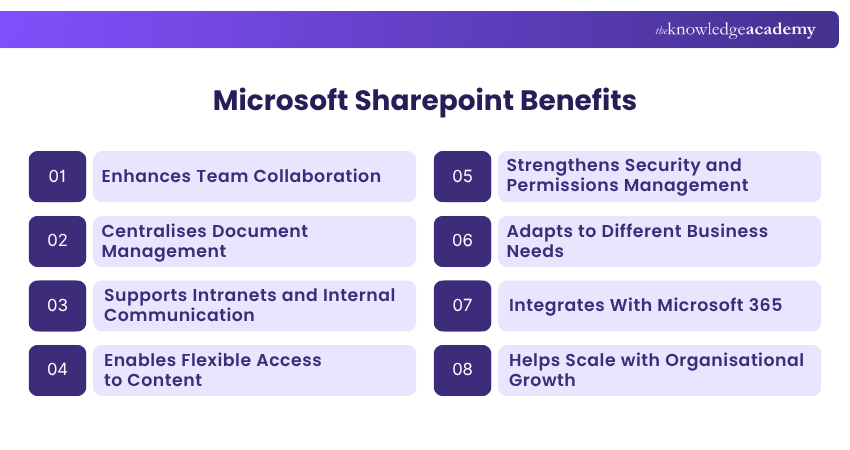
1) Enhances Team Collaboration
SharePoint enables teams to create sites where they can share documents, information, resources and updates. This can be particularly useful when employees work across different departments or locations.
Teams can also collaborate on shared content while keeping relevant information organised in one environment. This reduces reliance on lengthy email chains and makes resources easier for authorised users to access.
2) Centralises Document Management
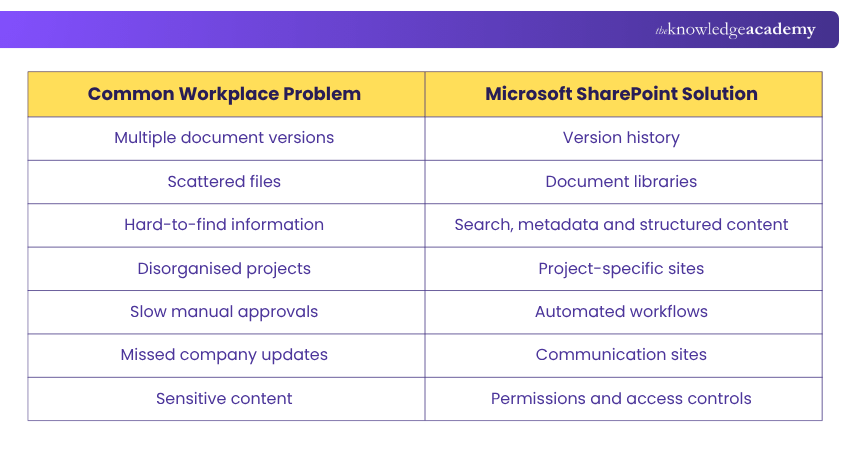
SharePoint provides a central location where teams can store, organise and access documents. Instead of files being scattered across emails, local drives or different folders, users can work from a shared source.
Features such as version history, metadata and document libraries can also make information easier to manage. Teams can track changes, locate documents and reduce confusion over which version of a file should be used.
Trainer's Insight
Design SharePoint around how people work. Build sites and libraries around real team workflows to make information easier to find, manage and use.
3) Supports Intranets and Internal Communication
SharePoint sites can bring company news, policies, resources, announcements and departmental information into one accessible intranet. This gives employees a structured place to find important workplace information and shared resources.
Teams can also use dedicated communication sites to publish news and important messages to wider audiences across the organisation.
4) Enables Flexible Access to Content
SharePoint allows authorised users to access shared content through supported web and mobile environments. This makes important information available across different locations and devices. This can help distributed and hybrid teams work more consistently.
Flexible access can include:
1) Shared Documents: Access files stored in document libraries
2) Team Resources: Reach materials shared across team sites
3) Company Information: View policies, news and internal resources
4) Project Content: Access relevant files and information while working across locations
5) Strengthens Security and Permissions Management
Not every employee needs the same level of access. SharePoint allows organisations to manage who can view, edit or share specific sites and content. These controls help ensure sensitive information is only available to individuals with the appropriate level of access.
Access can be managed across:
1) Sites: Control access to specific SharePoint sites
2) Documents: Manage who can view or edit files
3) Sharing: Set controls for how content is shared
4) User Roles: Assign permissions based on responsibilities
Strengthen SharePoint expertise with SharePoint Online Power User 55215B Training and manage sites, content, and collaboration confidently.
6) Adapts to Different Business Needs
Organisations can configure SharePoint sites, lists, libraries, and pages around different departments, projects, or information requirements. This flexibility allows teams to structure content according to their particular ways of working.
As requirements change, organisations can adjust their SharePoint environment to support new projects, processes and information needs without relying on the same structure for every team.
7) Integrates With Microsoft 365
SharePoint works with other Microsoft 365 applications and services, helping teams connect information with the tools they already use. These integrations help connect communication, document editing, file sharing, and workflow activities across everyday work. Common integrations include:
1) Microsoft Teams: Access and collaborate on SharePoint files through Teams
2) OneDrive: Sync and access SharePoint files through familiar file experiences
3) Power Automate: Automate processes involving SharePoint content
4) Power Apps: Build applications that can work with SharePoint data
SharePoint Readiness Check
Before expanding SharePoint use, check whether your organisation has:
☐ Clear content ownership☐ Defined permission structures☐ An agreed site structure☐ Governance rules in place☐ User training planned☐ A process for reviewing outdated content
8) Helps Scale with Organisational Growth
As an organisation grows, its teams, projects and information needs can become more complex. SharePoint can accommodate this growth by allowing organisations to create new sites, expand document libraries and structure content for different teams and business functions.
It can also be adapted as working practices and requirements change, helping organisations develop their digital workspace without rebuilding their entire information structure from scratch.
9) Automates Repetitive Workflows
Routine activities such as approvals, notifications and information updates can consume valuable time when handled manually. SharePoint can work with tools such as Power Automate to automate many of these processes.
For example, an organisation could create a workflow that automatically sends a document for approval and notifies relevant people when its status changes. This can reduce repetitive administrative work and support more consistent processes.
10) Improves Knowledge Sharing
Important organisational knowledge can easily become scattered across emails, individual files and different systems. SharePoint can provide a central space for policies, procedures, guides, resources and other shared knowledge.
By organising this information and making it accessible to the appropriate users, organisations can make it easier for employees to find and reuse existing knowledge rather than repeatedly requesting the same information.
The 5-Minute Information Hunt
Imagine you have just five minutes to find these five things in your organisation:
Can You Find?
1. The latest company policy
2. The current project document
3. An approved template
4. A new employee’s onboarding guide
5. An important departmental resource
Found all five? Your information may already be well organised.
Struggled with a few? SharePoint can help bring documents, resources and organisational information into a more structured and searchable environment.
11) Enhances Content Governance and Compliance
SharePoint helps organisations manage business information more consistently by providing structured sites, document libraries, permissions and content management capabilities. This can support organisational policies for how information is stored, accessed and maintained.
When used alongside appropriate Microsoft 365 compliance and governance tools, organisations can also apply retention, auditing and records management controls to help manage information throughout its lifecycle.
12) Simplifies Content Publishing and Management
SharePoint enables teams to create, edit and publish pages, news and other organisational content through SharePoint sites. This makes it easier to keep employees informed without relying solely on emails or scattered communication channels.
Content owners can make updates in one place, helping ensure policies, announcements, resources and other important information remain accurate and up to date.
13) Supports Project-specific Workspaces
Different projects often need their own documents, updates, resources and team information. SharePoint allows organisations to create dedicated sites for individual projects, keeping relevant content together in a structured workspace.
A project site can bring together:
1) Project documents
2) Key resources
3) Team information
4) Updates and announcements
5) Relevant links and reference materials
Drive more efficient collaboration across teams with SharePoint Power User 2019 55294AC Training - Join now!

Gaurav Kalita is a Content Writer with 2+ years of experience in content development, research and storytelling. His background in English literature and teaching, combined with his growing interest in AI and Machine Learning, supports his writing across Business Skills and IT and Tech.
View Detail

 If you wish to make any changes to your course, please


