




We may not have the course you’re looking for. If you enquire or give us a call on 01344203999 and speak to our training experts, we may still be able to help with your training requirements.
Key Benefits of Microsoft Office You Should Know
ByThe Knowledge AcademyLast updated on: 17 September 2026
This blog explores the key benefits of Microsoft Office and how different users, from businesses and professionals to students and personal users, can apply them.

A report needs formatting.
A spreadsheet needs analysing.
A meeting needs scheduling.
A presentation needs preparing.
Many everyday tasks involve different types of information, yet they often need to work together. This is where Microsoft Office can simplify the process. Its applications support writing, calculation, communication, presentation, organisation, and collaboration within familiar productivity workflows. Knowing which tool to reach for at each stage is often what separates a smooth day from a scattered one.
What is Microsoft Office?
Microsoft Office is a collection of productivity applications developed by Microsoft. Well-known applications include Word for document creation, Excel for spreadsheets, PowerPoint for presentations, and Outlook for email and scheduling.
Microsoft now provides many of these applications through Microsoft 365 alongside cloud-based services and collaboration capabilities. Together, they support common tasks such as creating content, organising information, communicating, analysing data, and sharing files.

Benefits of Microsoft Office
Microsoft Office combines applications designed for different productivity requirements. Its value comes not only from individual tools but also from how they can support connected workplace and personal workflows. The following benefits show how Microsoft Office can support everyday productivity:
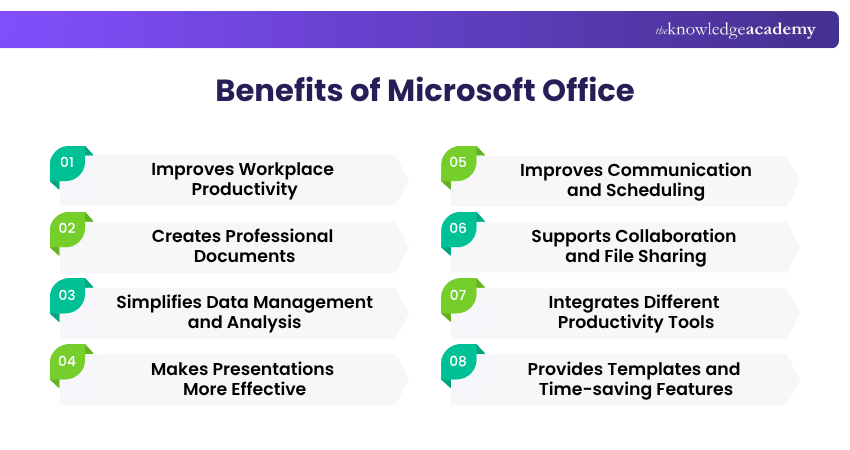
1) Improves Workplace Productivity
Microsoft Office brings commonly used productivity applications into familiar workflows for documents, data, presentations and communication. This can help users complete everyday activities without constantly moving between unrelated software.
Having suitable tools for different tasks also makes information easier to create, organise and communicate. This can support smoother workflows across individual and team responsibilities.
2) Creates Professional Documents
Microsoft Word provides tools for creating reports, proposals, letters, policies, CVs, and other professional documents. Styles, headings, tables, page layouts, and formatting controls help users create information that is structured and easier to read.
Features such as spelling and grammar assistance, comments, track changes, and document templates can also support the editing process. This helps individuals and teams produce clearer documents while maintaining greater consistency across their work.
3) Simplifies Data Management and Analysis
Microsoft Excel helps users organise information into structured spreadsheets and perform calculations using formulas and functions. Data can be sorted, filtered, summarised, and presented in formats that make patterns easier to understand.
Charts, PivotTables, conditional formatting, and analytical features can support deeper examination of datasets. These capabilities make Excel useful for activities ranging from budgets and schedules to operational reporting and business analysis.
4) Makes Presentations More Effective
Microsoft PowerPoint helps users organise information into visual presentations for meetings, training, proposals, lessons, and reports. Slides can combine text, images, charts, diagrams, and multimedia to communicate ideas in a structured format.
Themes, layouts, templates, and presentation tools can also help maintain visual consistency. When used thoughtfully, these features allow presenters to emphasise key information without overwhelming audiences with unnecessary detail.
5) Improves Communication and Scheduling
Microsoft Outlook brings email, calendars, contacts, and scheduling capabilities into one application. Users can manage conversations, arrange meetings, organise appointments, and keep track of upcoming responsibilities from a central workspace.
Calendar sharing and meeting invitations can also simplify coordination between colleagues. Instead of managing schedules through separate conversations, teams can check availability and communicate meeting information more efficiently.
Take the first step towards understanding data visualisation - Join our Microsoft Visio Training today and bring your ideas to life!
6) Supports Collaboration and File Sharing
Microsoft Office applications can support collaborative work when documents are stored through compatible Microsoft cloud services. Multiple users can contribute to shared files, review changes, add comments, and coordinate work without repeatedly sending separate copies.
This can reduce confusion around document versions and make teamwork easier across different locations. Shared access is particularly useful when colleagues need to review reports, spreadsheets, presentations, or other materials together.
Can You Fix the Workflow?
A manager retypes the same figures three times: report, slide, email.The Problem: Data recreated, not reused, where errors creep in.A Better Way: Build it once in Excel, then link into Word and PowerPoint so updates carry through.Try This: What's one task you repeat across apps that could be built once instead?
7) Integrates Different Productivity Tools
Microsoft Office applications can work together across common productivity tasks. For example, users may analyse information in Excel, present the results in PowerPoint, and communicate the findings through Outlook.
This connection between applications can make workflows more efficient because information does not always need to be recreated from scratch. Users can move content between tools according to the task they need to complete.
8) Provides Templates and Time-saving Features
Microsoft Office includes templates for documents, presentations, spreadsheets, calendars, and other common tasks. Starting with an existing structure can reduce the time required to create routine materials from a blank page.
Additional features such as AutoFill, reusable styles, formulas, keyboard shortcuts, and automated formatting can further reduce repetitive work. These tools are especially useful for tasks that follow similar formats or processes each time.
9) Supports Access Across Different Devices
Microsoft 365 provides supported Office applications through desktop, web and mobile environments, helping users continue suitable tasks across different devices. This flexibility can be useful for professionals who move between office, home and mobile working environments during the day.
Cloud-based file access can also make it easier to continue work from different locations without relying on a single device. Users can open, update and manage compatible files more conveniently, although available features can vary by application, device, subscription and organisational settings.
Myth vs Fact
Myth: Microsoft Office is mainly useful on desktop computers.Fact: Many Microsoft 365 applications can also be accessed through supported web and mobile environments.
10) Develops Useful Workplace Skills
Microsoft Office skills can support many administrative, analytical, communication, and business roles. Knowing how to structure documents, work with spreadsheets, prepare presentations, and organise email can improve confidence with everyday workplace responsibilities.
Advanced knowledge can provide additional value. Skills such as Excel analysis, Word document management, PowerPoint design, and productivity automation can help professionals handle more complex tasks and improve the quality of their work.
Learn to organise and manage your inbox with our Microsoft Outlook Training - Join now!
Benefits of Microsoft Office for Different Users
The value of Microsoft Office can vary depending on how and where it is used. Businesses, learners, educators, and personal users often rely on different applications and capabilities. The following examples show how Microsoft Office can support different types of users:
1) Businesses and Professionals
Businesses can use Microsoft Office to standardise everyday workflows across documentation, analysis, communication and reporting. Familiar applications can also make it easier for employees across different functions to exchange and work with information.
2) Students and Educators
Students can use Word for essays and assignments, Excel for coursework involving data or calculations, and PowerPoint for group presentations, building practical digital skills alongside their academic work.
Educators can use the same applications to prepare lesson materials, track student progress in spreadsheets, and give structured feedback through comments and tracked changes rather than separate handwritten notes.
3) Personal Users
Personal users can apply Microsoft Office to activities such as budgeting, CV preparation, record keeping and personal planning. Templates and familiar tools can make these everyday tasks easier to organise without specialist software.
Are you looking for ways to enhance your productivity and complete your tasks efficiently? Join our Microsoft Office 365 Training right now!

The Knowledge Academy develops accessible learning content across Project Management, IT, Cybersecurity, Data Science, Business Analysis, HR, Accounting and Finance, Leadership and Health and Safety. Its resources combine subject research with clear explanations to help professionals build practical knowledge across a wide range of disciplines.
View Detail

 If you wish to make any changes to your course, please


