


 Top Rated Course

We may not have the course you’re looking for. If you enquire or give us a call on +44 1344 203 999 and speak to our training experts, we may still be able to help with your training requirements.
What is Wireshark? Knowledge of Network Traffic Analysis
Richard Harris 25 February 2026Wireshark is a free, open-source tool that captures, analyses, and troubleshoots network traffic, showing detailed data about packets and connections. It helps professionals detect security threats, diagnose performance issues, and understand network behaviour. Ideal for network engineers and cybersecurity experts.

Training Outcomes Within Your Budget!
We ensure quality, budget-alignment, and timely delivery by our expert instructors.
Table of Contents

For both security and efficiency, network visibility is important. Its accuracy and thoroughness have made it a favourite tool among IT specialists all over the world. So, the question, What is Wireshark and how it works in real-life applications, arises. Let's look at those in this blog.
Table of Contents
1) What is Wireshark?
2) Getting Started with Wireshark
3) Advanced Features on Wireshark
4) Troubleshooting with Wireshark
5) How to Install Wireshark?
6) When Should Wireshark Be Used?
7) Conclusion
What is Wireshark?
Wireshark is an advanced network protocol analyser that has the ability to capture and analyse data packets in real-time. It is capable of spotting problems, vulnerability detection, and facilitating the understanding of communication between systems. Hence, it is a must-have tool for both network and security experts, being an open-source one.
Overview
At its essence, Wireshark is an open-source tool designed to inspect, capture, and analyse network data in real-time. Its user-friendly interface belies its sophisticated functionalities, making it accessible to both seasoned professionals and those new to the realm of network analysis. Wireshark's ability to decode and display intricate communication protocols allows users to witness the intricate dance of data packets exchanged between devices.

Purpose and Applications
Wireshark serves a multitude of purposes, making it an indispensable asset in various domains. For network administrators, it functions as a troubleshooter, helping identify connectivity issues, bottlenecks, and areas for performance optimisation. In the domain of cybersecurity, Wireshark has become a detective tool, detecting anomalies, analysing encrypted traffic, and aiding in forensic investigations.
Unlock the full potential of data visualisation with our Microsoft Power BI Course today!
Getting Started with Wireshark
Wireshark opens a world of possibilities for understanding and optimising network communication. Let's dive into the essential aspects of using Wireshark, exploring its interface, initiating packet captures, and leveraging display filters for focused analysis.
1) Interface Overview
Wireshark, when opened, presents a clear and orderly interface that makes it easy to navigate. The central screen depicts the ongoing packet-capturing process at the same time. It is through the toolbar that one can control the capture process, set filters, and perform network data analysis with great efficiency. Getting acquainted with these functions and services allows one to acquire a more profound understanding of the network's activity.
2) Capturing Packets
The primary task of Wireshark is to grab packets from the selected network interface. Pick your preferred interface and hit the Start button to commence live capturing. With the help of capture filters, you can limit the analysis to particular devices or protocols, which will make it more accurate and faster.
3) Display Filters
The overwhelming task of sorting through a large number of captured packets, however, can be made easier and more efficient with the help of display filters. You can apply filters to your analysis based on IP address, protocol, or time frame. This allows you to quickly detect critical patterns or problems in the network data that has been captured.
4) Protocol Analysis
Wireshark's prowess extends to detailed protocol analysis. Click on a packet of interest, and Wireshark decodes the various layers of the protocol stack, offering a comprehensive view of the data exchange. Understanding how to interpret these protocol details is crucial for advanced troubleshooting and optimisation.
5) Follow TCP Stream
A more comprehensive perspective on communication between two endpoints is offered by the "Follow TCP Stream" feature of Wireshark. By means of this utility, the whole dialogue is reconstructed and presented, which helps in comprehending the context and substance of data transfers.
6) Conversations
The "Conversations" feature in Wireshark provides a summarised view of communication between different hosts. It offers insights into the volume of data exchanged, helping identify top talkers on the network and potential areas of concern.
Advanced Features on Wireshark
The more skilled you become with Wireshark, the more you will realise that exploring its advanced features is a way to develop your network analysis abilities. The insights that you will get, thanks to the tools, are going to be much more in-depth concerning the traffic shapes, protocols, and the data in question. This part of the article opens up the powerful features that let you benefit the most from Wireshark.
1) Colouring Rules
Wireshark allows you to apply custom colouring rules to packets based on specific criteria. This feature aids in visually identifying packets of interest, streamlining the analysis process. Experiment with different colour schemes to tailor the display to your preferences and analysis requirements.
2) Customising Columns
Customising columns in Wireshark lets you choose which packet details to display, tailoring the view to your specific needs. This flexibility enhances efficiency, allowing you to focus on the information most relevant to your analysis. Experiment with different column configurations to find the setup that suits your workflow.
3) Expert Info
Wireshark's "Expert Info" provides warnings and additional information about potential issues within the captured data. Understanding and interpreting these insights can be crucial for identifying anomalies, performance bottlenecks, or security-related issues. The "Expert Info" feature acts as a guide, offering suggestions for optimising network performance and troubleshooting effectively.
4) Protocol Hierarchy
Wireshark's protocol hierarchy feature provides a hierarchical view of the protocols present in the captured data. This allows you to quickly assess the distribution of protocols and identify any unexpected or abnormal patterns. Understanding the protocol hierarchy is instrumental in diagnosing issues and optimising network performance.
5) Packet Marking
Wireshark enables you to mark specific packets for future reference or analysis. This feature is particularly useful when working with large datasets, allowing you to flag packets of interest for further investigation. Experiment with packet marking to streamline collaboration and ensure essential packets are highlighted for review.
6) Statistical Tools
Wireshark offers a range of statistical tools that provide insights into network behaviour. From conversation statistics to endpoint statistics, these tools offer a quantitative view of network activity. Leveraging statistical information enhances your ability to identify trends, patterns, and potential issues within the captured data.
7) StreamGraphs
The StreamGraph feature in Wireshark visualises the volume of data exchanged between hosts over time. This graphical representation offers a dynamic view of network activity, aiding in the identification of trends and anomalies. Explore StreamGraphs to enhance your understanding of data flow patterns.
Troubleshooting With Wireshark
Wireshark, a versatile network protocol analyser, stands as an indispensable tool for troubleshooting network issues. This section comprehensively explores the multifaceted role Wireshark plays in identifying, diagnosing, and resolving diverse challenges in network environments:

1) Identifying Network Issues
Wireshark's real-time packet analysis capability is instrumental in identifying and resolving network issues. Whether dealing with intermittent connectivity problems, sudden performance degradation, or unexpected outages, Wireshark provides a granular view into the flow of data, enabling swift issue identification and resolution.
2) DNS Troubleshooting
Wireshark simplifies DNS troubleshooting by capturing and presenting DNS queries and responses in real-time. This feature aids in identifying DNS-related issues such as failed lookups, slow response times, or potential security concerns. Analysing DNS traffic through Wireshark streamlines issue identification, facilitating quick and effective resolution.
3) TCP/IP Troubleshooting
Wireshark's analysis of TCP/IP communications serves as a powerful asset for troubleshooting. Whether addressing connection failures, packet loss, or overall performance degradation, Wireshark's packet-level insights enable users to delve into the intricacies of TCP/IP protocols. This depth of analysis is crucial for effective troubleshooting and optimisation in complex network environments.
4) Analysing Network Latency
Wireshark allows users to analyse network latency by examining the time it takes for packets to travel from source to destination. This feature is essential for identifying delays in data transmission, enabling users to pinpoint bottlenecks and optimise network performance.
5) Investigating Bandwidth Issues
Wireshark provides a comprehensive overview of bandwidth utilisation by capturing and analysing network traffic. Users can identify bandwidth-intensive applications, detect unusual spikes in usage, and make informed decisions to optimise bandwidth allocation for improved network efficiency.
6) VoIP Troubleshooting
Wireshark is a valuable tool for troubleshooting Voice over Internet Protocol (VoIP) issues. By capturing and analysing VoIP packets, users can identify issues like jitter, latency, and packet loss, ensuring optimal voice communication quality across the network.
7) Analysing Wireless Network Problems
For those dealing with wireless network issues, Wireshark can capture and analyse wireless traffic. It helps identify interference, signal strength issues, and connectivity problems in wireless networks, facilitating targeted troubleshooting and resolution.
How to Install Wireshark?
The installation process of Wireshark is very fast and simple. You can get it for free from the official website and follow the step-by-step instructions for your operating system. The installation procedures for Windows and Linux devices are given below.
For Windows Devices
a) Visit the official Wireshark website and download the latest Windows installer.
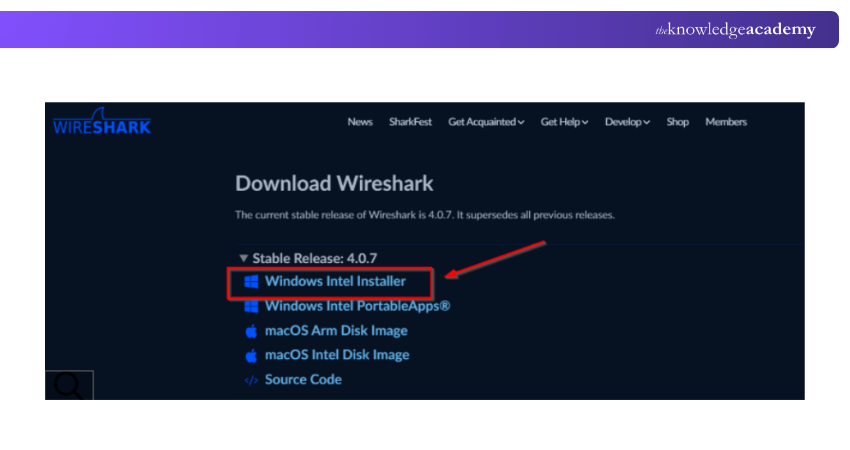
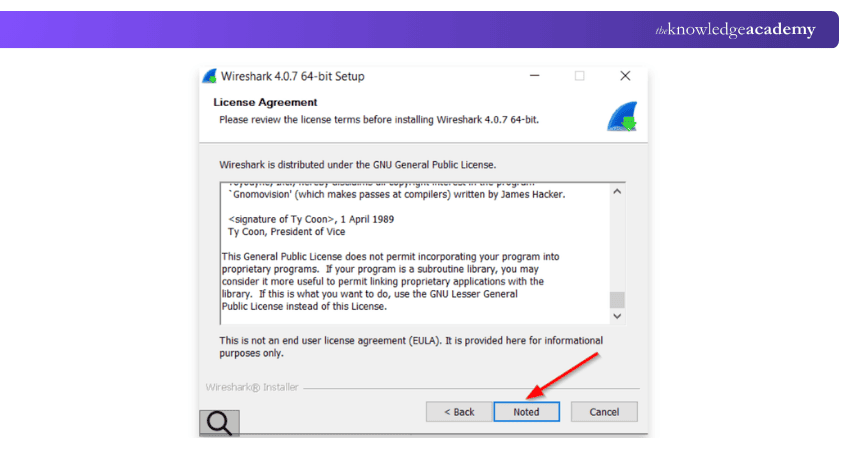
b) Once downloaded, run the setup file and follow the installation wizard.
c) Accept the license agreement, select the default components, and when prompted, install Npcap to enable packet capturing.
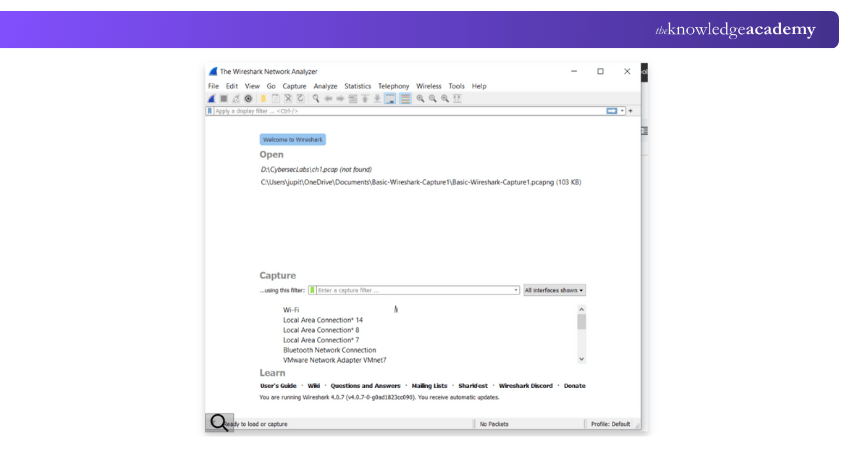
d) After installation, launch Wireshark from the Start menu to begin analysing network traffic.
For Linux Devices
For Debian-based systems (such as Ubuntu), open a terminal and update your package list with sudo apt update -y, then upgrade packages using sudo apt upgrade -y. Install Wireshark with:

At the configuration prompt, decide whether non-superusers are allowed to capture packets — granting this makes Wireshark usable without root.

And on Arch-based distributions:

In each case, the installation process covers all necessary dependencies and once complete you can launch Wireshark from your application menu or terminal.
Unlock data insights and create dynamic business reports with Crystal Reports Training – Join now!
When Should Wireshark Be Used?
Wireshark is a robust tool used for capturing and analysing network traffic, vital for identifying and solving network problems, improving performance, and strengthening security. Wireshark's detailed packet-level analysis assists users in comprehending the flow and content of network data, making it a popular choice for IT professionals and cybersecurity teams.
The appropriate times to utilise Wireshark:
a) Connectivity: Find and resolve network problems such as connection issues, delays, and data loss.
b) Improve Performance: Examine data movement to identify bottlenecks.
c) Security Audits: Keep an eye out for any odd traffic or harmful actions.
d) Protocol Development: Examine and troubleshoot protocols while in the development phase.
e) Network Forensics involves collecting data for in-depth analysis after an event.
Conclusion
So, What is Wireshark? A tool that gives you a chance to witness the actual happenings taking place in a network. It converts the raw data into valuable insights, thus assisting in the identification of problems and the provision of security. Excelling at network traffic analysis, you get to acquire a crucial skill that all IT professionals need in the modern interrelated world.
Transform your business data into actionable insights with our Business Intelligence Reporting Training. Register now!
Frequently Asked Questions
Can Wireshark Capture Encrypted Data?

While Wireshark can capture encrypted data, it can't decrypt it without the appropriate keys. However, it provides valuable insights into encrypted network traffic, aiding in identifying sources of encrypted communication and potential security concerns.
Is Wireshark Suitable for Beginners?
Yes, Wireshark is beginner friendly. Its intuitive interface and user-friendly features make it accessible for those new to network analysis. Start with basic packet captures, gradually exploring advanced functionalities as you become more comfortable.
What are the Other Resources and Offers Provided by The Knowledge Academy?
The Knowledge Academy takes global learning to new heights, offering over 3,000+ online courses across 490+ locations in 190+ countries. This expansive reach ensures accessibility and convenience for learners worldwide.
Alongside our diverse Online Course Catalogue, encompassing 17 major categories, we go the extra mile by providing a plethora of free educational Online Resources like Blogs, eBooks, Interview Questions and Videos. Tailoring learning experiences further, professionals can unlock greater value through a wide range of special discounts, seasonal deals, and Exclusive Offers.
What is The Knowledge Pass, and How Does it Work?
The Knowledge Academy’s Knowledge Pass, a prepaid voucher, adds another layer of flexibility, allowing course bookings over a 12-month period. Join us on a journey where education knows no bounds.
What are the Related Courses and Blogs Provided by The Knowledge Academy?
The Knowledge Academy offers various Business Intelligence Reporting Courses, including the Business Intelligence Analyst Course, Microsoft Power BI Course, and QlikView Training. These courses cater to different skill levels, providing comprehensive insights into SSRS vs Power BI.
Our Office Applications Blogs cover a range of topics related to Earned Value Management, offering valuable resources, best practices, and industry insights. Whether you are a beginner or looking to advance your Office Applications skills, The Knowledge Academy's diverse courses and informative blogs have got you covered.

Richard Harris


Senior Full Stack Developer and Technology Educator
Richard Harris is a highly experienced full-stack developer with deep expertise in both frontend and backend technologies. Over his 12-year career, he has built scalable web applications for startups, enterprises and government organisations. Richard’s writing combines technical depth with clear explanations, ideal for developers looking to grow in modern frameworks and tools.

Upcoming Office Applications Resources Batches & Dates
Date
 Microsoft Power BI Training
Microsoft Power BI Training
Wed 8th Jul 2026
Microsoft Power BI Training
Wed 5th Aug 2026
Microsoft Power BI Training
Thu 3rd Sep 2026
Microsoft Power BI Training
Wed 7th Oct 2026
Microsoft Power BI Training
Wed 4th Nov 2026
Microsoft Power BI Training
Wed 9th Dec 2026

 If you wish to make any changes to your course, please


