

 Back
Back

 Get A Quote
 OneNote Masterclass
Ideas Take Shape in OneNote
The Knowledge Academy is Globally Recognised as the Market Leader in providing Microsoft training. Our "Microsoft Expert Team" comprises over 27 leading Professionals with 16 years of experience working with Microsoft Office Suite apps to support an organisation's productivity. Our specialised instructors have developed unique teaching styles to help aspiring candidates gain the skills required to use OneNote for accessing information more quickly and easily.
 Up to 40% Off - Limited Time Offer

Salient Features of OneNote
OneNote Masterclass Course Overview
OneNote is part of Microsoft Office, and it enables individuals to keep notes, files, articles, pictures, and more information in a single digital notebook. It is a digital note taking application and an essential productivity tool for businesses that fully influences Microsoft technologies and the cloud to capture, store, and share information. OneNote helps organisations and individuals categorise and secure their important data in the form of notebooks and allows them to extract information from a web page to OneNote, which they can easily access on any computer, tablet, or phone.
Our OneNote Masterclass Course is designed to provide delegates with the specific tips and tricks required to use OneNote to enhance their productivity. In this course, delegates will learn how to customise a page template, use web links, add audio and video files, distribute notebooks, etc. Our highly skilled and professional trainer will conduct this training to help the delegates gain the skills required to support their career development.
 Need More Information

OneNote Masterclass Course Outline
Module 1: Getting Started with OneNote

- Introduction to OneNote
- Understanding the OneNote Layout
- OneNote Environment
- OneNote Help
Module 2: Creating a OneNote Notebook
- Creating a New Section
- Creating a New Page
- Creating a New Subpage
- Adding Content
- Using the Send to OneNote Tool
- New Quick Note
Module 3: Using OneNote Templates
- Inserting Page Templates
- Setting a Default Template
- Creating a Custom Page Template
- Customise a Page Template
Module 4: OneNote with Other Applications
- Linking and Embedding Files
- Using Web Links
- Adding Audio and Video Files
- OneNote with Outlook Meetings and Tasks
Module 5: Formatting and Organising Notebooks
- Formatting Notebook Pages
- Using Tags
- Searching Notebooks
Module 6: Distributing Notebooks
- Exporting Notebooks
- Sending Notebooks
- Printing Notebooks
- Sharing Notebooks
Module 7: Managing Notebooks
- OneNote Recycle Bin
- Deleting OneNote Items
- Notebook Backups
- Working with Drawing Tools
Our Available Delivery Methods
The Knowledge Academy has been World's Leading Association serving professionals and corporate's training requirements for years. The Knowledge Academy's presence is global, and we provide training in 490+ locations in around 221+ countries, covering 3000 subjects with the following delivery methods:


Classroom Training
Get trained in a quiet, safe, and clean environment, which is away from the noise and pressure of the work area.
Enquire Now


Online Instructor-Led Training
Access our award-winning training courses at your home without going anywhere.
Enquire Now


Online Self-Paced Training
Get Immediate 90 days of access to the E-Learning portal, which is accessible 24/7.
Enquire Now


Onsite Training
Train multiple employees at the place, time, and environment of your choice.
Enquire Now
What is OneNote and Why it is a versatile tool?
Microsoft OneNote is a digital notebook that automatically saves and syncs your notes as you work. You can use it to remember upcoming tasks, capture your ideas, organise your to-do lists, and more. It is a powerful tool used to embed Excel sheets in notes, pull text from images, and more. Many reasons make OneNote a versatile tool for improving productivity as it helps to:
- Sort information in your notebook or add it from other apps and web pages
- Take handwritten notes or illustrate your ideas
- Use highlighting and tags for easy follow-up
- Share notebooks to collaborate with others
- Access your notebooks from any device
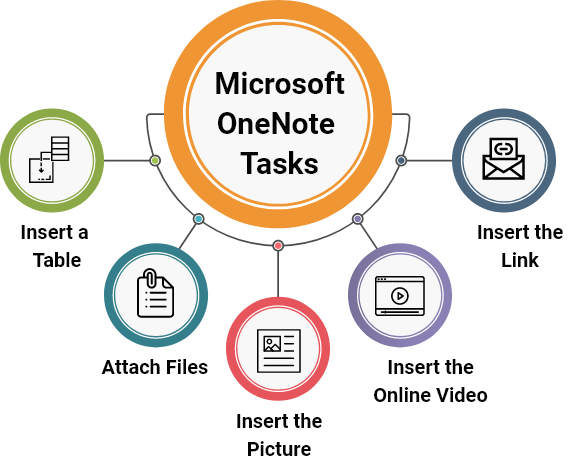
Basic Tasks in Microsoft OneNote

100
+Courses Running Daily

490
+Locations Worlwide

2
M+Global Learners

2
K+Certified Trainers
What are the Benefits of Onsite Training for Organisations?
Onsite training is provided to the employees at their worksite or organisation's preferred location. It ensures a comfortable learning environment within employees' workplaces. Onsite training has been adopted globally by organisations in this new technological era to ensure that the employees are accustomed to the current technology and work practices. Following are some factors in which industries grown after adopting onsite training:
Employee Motivation Increased
Productivity Enhanced
Sales Growth
Employee Retention
Benefits of OneNote Masterclass Course

Professionals Agree that OneNote is Ideal for Businesses
Our OneNote Masterclass course provides various benefits to help the organisations being more productive
Why Choose Us
We help you quench your thirst for knowledge by providing you with our specially tailored certifications. Our highly qualified instructors, dedicated staff, and 24/7 available helpline are the main reasons why we're the go-to training provider for you.
 Have Any Question?

Best Price Guarantee
You won't find better value in the marketplace. If you find a lower price, send us the offer, and we'll beat it.

Guaranteed to Run
Our training courses are 100% guaranteed to run on dates provided, whether they are classroom, virtual, or in-house.

Highly Experienced Staff
Our support staff and instructors have years of experience in tending to the specific needs of our clients and delivering on our exceptional quality.

Award-Winning Training Material
Our training programmes are supported by our well researched, unique, and high-quality course material that will assist the learners in gaining full knowledge and insights into the desired subject matter.
Specifications of Microsoft OneNote
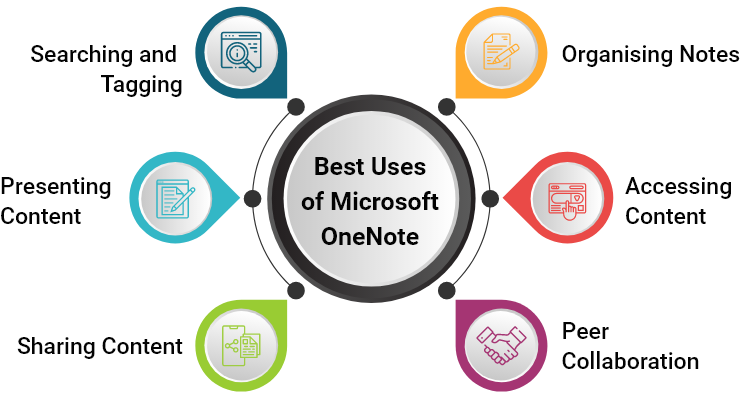
- Create your Way: Type, write, or draw without the feel of pen and paper. Search and clip from the web to visualise ideas.
- Collaborate with Anyone: Stay on the same page and coordinated from wherever you are. Whether it’s your team capturing the idea of the century or your family preparing the menu for a big gathering.
- Think with Ink: Take handwritten notes and convert them to typed text later. Highlight what is important and express ideas with colours or shapes.
- Access from Anywhere: It is easy to check up on your content from anywhere. Start on your laptop, then update notes on your phone.
Best Uses of Microsoft OneNote
What Our Clients Say About Us
Thomas was brilliant during my virtual onenote masterclass course. I could not have wished for a more engaging trainer. He helped me to understand every topic of the course with ease. The material was professionally designed, which made the whole training easy to understand. The customer service provided by the knowledge academy is exceptional. I enjoyed my experience from this course and I will be back for more courses here.

Marcia Jackson

I just completed the OneNote masterclass course at the knowledge academy. The course material was excellent, organised sequentially, and I had no issues with the course content or how it was delivered. My trainer James taught the course at a reasonable pace, explained things well and was incredibly patient and encouraging. It was a great experience learning from an experienced trainer.
Midori Wilkinson
Yesterday I completed a onenote masterclass course with Bailey in an online instructor-led method. And without a doubt he was a fantastic and highly skilled onenote trainer. He taught us most of the topics with examples and walked us through onenote features with real life uses. The material provided by the knowledge academy was crystal clear, which was easy to understand and professionally designed. Highly recommended!
Stephen Hobart
I did my onenote masterclass from the knowledge academy, Kalvin exceptionally delivered it. He was an engaging trainer and did a brilliant job of taking us through the course material, which was also well-tailored by the knowledge academy. It was a fantastic course with a huge amount of content very well delivered virtually. I had learned various new notes keeping techniques from this training.
Peter Woakes
I have enjoyed my onenote training from the knowledge academy. Jasmin brilliantly delivered it on the zoom application. She was accommodating to reflect on the uses of the onenote application, how to categorise notes on it, and effective ways to note down essential data in notebooks. I will recommend everyone to do this onenote course with the knowledge academy to understand some excellent uses of this tool.
Lara Forrester
Last week I signed up to do the onenote masterclass course from the knowledge academy. The material, which was prepared for training, was very useful. My trainer Alex was helpful, knowledgeable, and most importantly, he was very intelligent and experienced. I have enjoyed and learnt a lot from the examples he gave to us. I will definitely come for other Microsoft office courses to enhance my skills.
Eric van Eeden
Frequently Asked Questions
What is the OneNote?
Microsoft OneNote is an Office suite application used for personal note-taking and collaboration at workplaces and schools. It includes high-level features, such as optical character recognition, audio and video recording, ink-to-text conversion, and more.
Why OneNote is the ultimate note-taking tool?
OneNote is the ultimate note-taking tool because it has a similar interface to other Microsoft Office tools, logical hierarchy, part of SharePoint and Office 365 groups, integration with Outlook, is mobile-friendly, and includes online editing.
What are the benefits of the Microsoft OneNote?
It enables collaboration in real-time, secures sensitive information, can record ideas and information on the go, supports notes with multimedia, and can be integrated with other software. These are the benefits of the Microsoft OneNote.
Why is OneNote ideal for businesses?
OneNote makes it easier for businesses to focus on working rather than spending their time thinking about how to work on planned projects. With OneNote, teams can rapidly access their appropriate planning information, share their ideas, share documents, and combine a range of media types, resulting in efficiency and enhancing the business productivity.
What are the productivity benefits of Microsoft OneNote?
Microsoft OneNote's productivity benefits include improved sharing and synchronisation, improved tables, and enhanced file embedding.
What I will learn in the OneNote Masterclass course?
During OneNote Masterclass course, you will learn how to create a new notebook, section, page, and subpage. You will also learn to use OneNote templates, customise a page template, use web links, add audio or video files in the notebooks, and many more concepts to help you learn the optimum use of OneNote.
Will this course help me to get a better job with a high salary package?
Individuals who hold knowledge and skills to efficiently work with Microsoft OneNote get higher ranks in companies and get paid more than any average Professional.
Can you customise training and course material according to our company requirements?
Yes, we have subject matter experts who will work according to your company requirements.
Can The Knowledge Academy deliver corporate/in-house training?
Yes, our specialised in-house/corporate delivery staff constantly works to provide training to our clients who wish to have the convenience and comfort of learning within their familiar surroundings.
I am unable to find the course that I am looking for.
The Knowledge Academy provides training on over 3000 different subjects. Please contact us if you are unable to find your ideal course in the above course list.
Can The Knowledge Academy deliver the training to more than 1000 delegates of my company?
Yes, we already trained over 1000 delegates from multiple internationally renowned organisations. In cases where the delegates are more, we provide training in groups.
Which delivery methods I can choose for the OneNote Masterclass Course?
You can choose from any of the below delivery methods according to your requirements:
- Online: If you want to learn at your own pace and at any time in the day or night.
- Online Instructor-Led or Virtual: If you want to learn virtually from the instructor at the comfort of your home.
- Classroom: If you want to attend training at one of The Knowledge Academy's venues.
- Onsite/Corporate: If you are looking for a training solution for your employees at your preferred premises.


 Enquire for More Information