

 Back
Back

 Get In
Touch
Get In
Touch
Microsoft Word Masterclass
 Nurture Your Innovative Skills by Learning Microsoft Word
The Knowledge Academy is Globally Recognised as the Market Leader in providing Microsoft training. Our "Microsoft Office Expert Team" comprises over 27 leading Professionals with 16 years of working experience in creating and presenting documents successfully. Our specialised instructors have developed unique teaching styles to help aspiring candidates gain the highly demanded skills by organisations nowadays, increase their work efficiency, confidence, and job satisfaction.
 Up to 40% Off - Limited Time Offer
Microsoft Word Masterclass Overview
Microsoft Office is an extremely valuable tool used in schools, homes, and offices to effectively organise, manage, and present information, data, and figures. It is a set of Office applications such as Word, Excel, PowerPoint. Microsoft Word is a successful word-processing program primarily used for creating, polishing, and sharing documents like brochures, letters, learning activities, quizzes, and more. Our Microsoft Word Masterclass course allows individuals to utilise this software effectively to process raw facts into meaningful information. It is a beneficial office suite for individuals to build various innovative learning methods, presenting thoughts, brand building, documents, and much more. Our specialised trainer will conduct the training with high experience in making their topics engaging by creating a memorable and valuable learning environment.
 Need More Information

 Enquire Now
Microsoft Word Masterclass Course Outline
Module 1: Ribbon Interface

- Ribbons
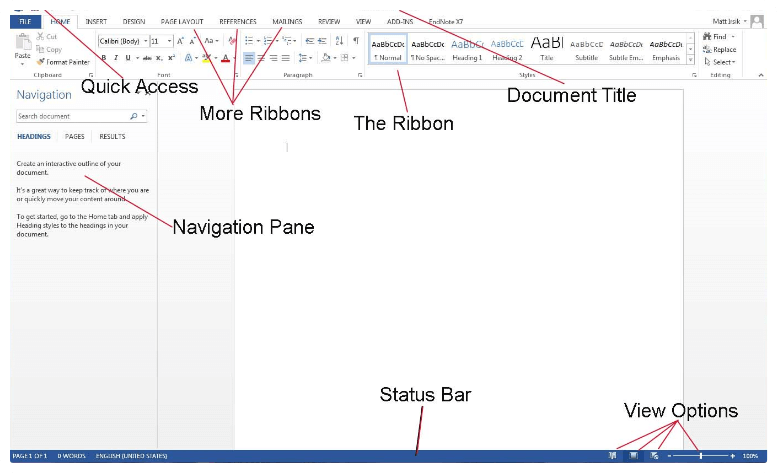
- Main Components of the Word Screen
- File Menu
- Quick Access Toolbar
- Insertion Area
- Status Bar
- Customising the Status Bar
- "Tell me what you want to do" Option
Module 2: Utilising Text
- Selecting Text
- Moving Text
- Applying Advanced Text Effects
- Change Case
- Font Dialogue Box
- Using Tabs
- Paragraph Options
Module 3: Printing and Viewing Your Document
- Layouts and Views
- Viewing Tools
- Read Mode
- Print Layout
- Web Layout
- Outline View
- Draft View
- Using Print Preview
- Printing a Document
Module 4: Managing Your Documents
- Creating a New Document
- Opening an Existing Document
- Importing Text from One Document to Another
- Closing a Document
- Saving a Document
Module 5: Using Formatting Tools and Tables
- Formatting Tools
- Inserting Tables
- Table Layout Tab
- Positioning Text Within a Cell
- Converting Text into a Table
- Formatting Tables
- Adding Rows and Columns
Best Selling Courses in Spain
Most Popular Skill-Enhancement Training Courses


Significance of Using Microsoft Word
Microsoft Word is a useful tool for making documents like letters, updates, reports, research projects, typesetting books and magazines, etc. It provides powerful tools for designing documents in many different ways. It checks language structure and spellings for mistake-free documents. It helps you with an in-built thesaurus for finding and writing proper synonyms to replace phrases and words. Microsoft Word is extremely helpful for organisations and individuals to create personalised documents of huge volume. It is also very helpful in making professional-quality letters, documents, reports and editing your files and documents efficiently.
 Tell Us More
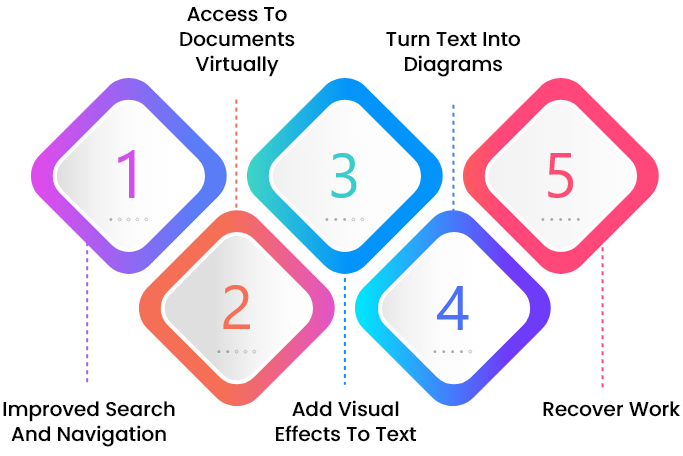
Benefits of Microsoft Word
Our Available Delivery Methods
The Knowledge Academy is World's Leading Association for training professionals. The Knowledge Academy provides training in 490+ locations in around 221+ countries, covering 3000 subjects with the following delivery methods:
Our Amazing Facts & Figures
We are the largest global training provider with a brilliant track record. Our amazing statistics are something to make us very proud of our work.
100
+
Courses Running Daily
490
+
Locations Worldwide
2
M+
Professionals Trained
Why Opt for Onsite Training?
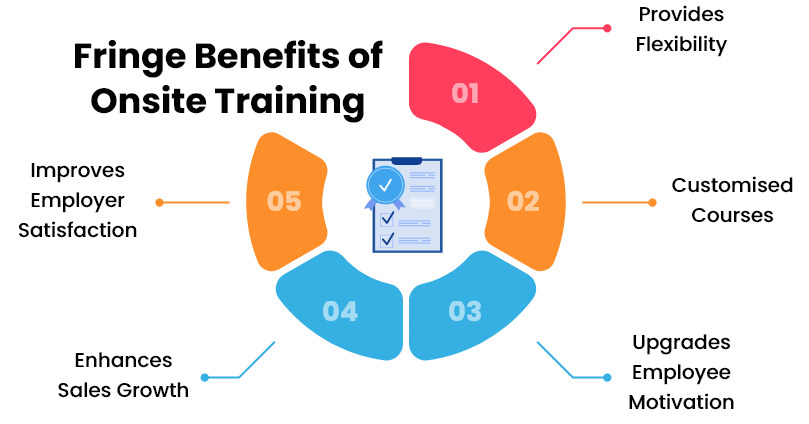
Onsite training is provided to the employees at their worksite or organisation's preferred location. It ensures a comfortable learning environment within your workplace. Onsite training has been adopted globally by organisations in this new technological era. Our Microsoft Word training is much more valuable for the corporate sector as it is specially designed to reach your highest expertise level by:
- Providing the flexibility of picking up a course at your convenient time.
- Helping you select courses according to your needs.
- Adopting approachable methods to improve creativity and performance.
- Learning innovative things in a suitable environment to save time and money.
 Request More Information
Why We are the Best
We help you quench your thirst for knowledge by providing you with our specially tailored certifications. Our highly qualified instructors, dedicated staff, and 24/7 available helpline are the main reasons why we're the go-to training provider for you.
 Have a Question?

Best Price Guarantee
You won't find better value in the marketplace. If you find a lower price, send us the offer, and we'll beat it.

Guaranteed to Run
Our training courses are 100% guaranteed to run on dates provided, whether they are classroom, virtual, or in-house.

Highly Experienced Staff
Our support staff and instructors have years of experience tending to our client's specific needs and delivering on our exceptional quality.

Award-Winning Training Material
Our training programmes are supported by our well researched, unique, and high-quality course content/material that will assist the learners in gaining full knowledge and insights into the desired subject matter.
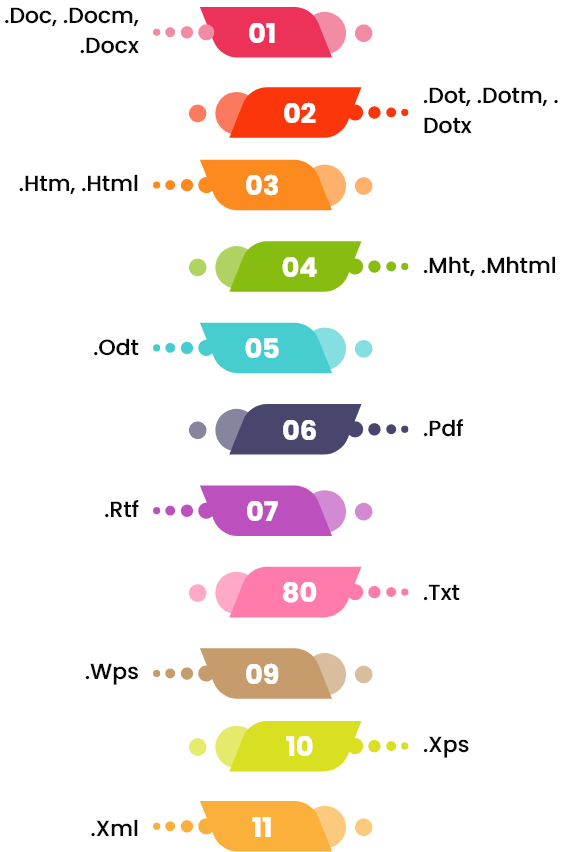
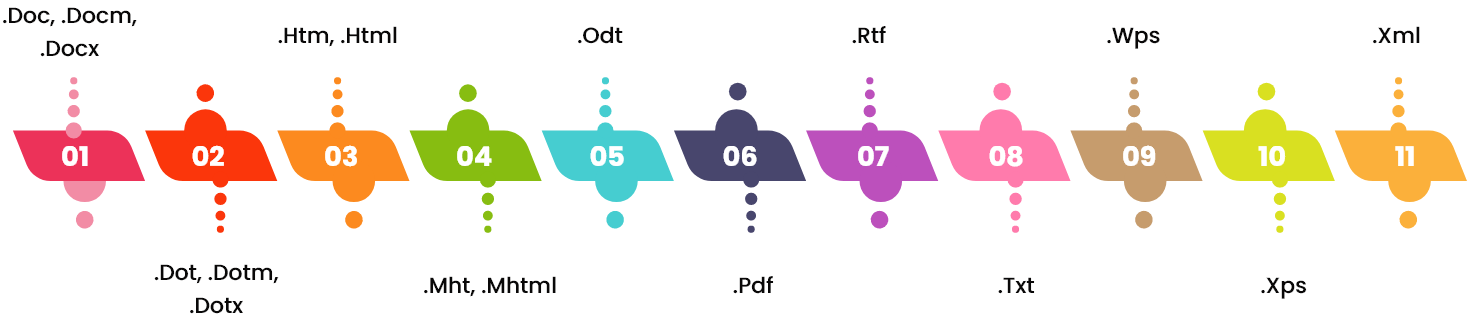
Types of Files Created and Used in Microsoft Word
What Our Clients Say About Us

Excellent course and an amazing instructor! Michelle was my instructor for this ms word training. This was the first time I did virtual learning. Although I was a bit nervous, the trainer taught us the study material smoothly. The material was nicely structured, pleasant to read and enabled us to understand everything properly. Thank you, Michelle. I will suggest everyone to opt for this course from here.

Marcia Jackson
This is the first time I am doing training from the knowledge academy. The microsoft word course was well structured, which made it interesting and informative. The course was great, and my trainer was very intelligent and experienced. Everything regarding the course was perfect. I had attended many training courses, but according to my experience, this was the best training I've ever had. Highly recommend this training course to my friends.
Rebecca Bills
I recently completed a Microsoft word course from the knowledge academy. In general, I found the whole experience to be a very positive one. My trainer for this course was Alexander, who was very professional. He was also able to deliver all the course material in a very rapid and concise way. I am really thankful to the knowledge academy for fulfilling my purpose of learning new practices. Best experience!
Sarah Jane
I purchased Microsoft word with Nadeem, and I have to say, I thoroughly enjoyed the course. I am impressed with the explanation of content in an easy and step by step approach! The training was well-paced and detailed without unnecessary information. The course content was clear, and easy to understand each concept. I highly recommend this course to my fellow members of this wonderful training site.
Stephen Hobart
I was very happy with my experience with the Microsoft Word course. Augustus, my trainer, was very helpful in sharing practical advice. His experience with the teaching of this course was wonderful. He was an extremely knowledgeable, professional, and polite person. He was happy to answer every question patiently. Thank you, the knowledge academy and my trainer, for this amazing learning experience.
Lara Forrester
Frequently Asked Questions
What is Microsoft Word?


Microsoft Word is a useful tool for creating documents like letters, reports, research projects, typesetting books and magazines, etc.
What are the uses of Microsoft Word?
Microsoft Word is used in various tasks, such as making resumes, writing reports and publishing PDFs, memos and forms, integrating with other Office programs, etc.
What are the features of Microsoft Word?
The features of Microsoft Word include converting a list into a table, converting a bulleted list to SmartArt, creating a custom tab, adding placeholder text, changing case, quick parts, etc.
What are the benefits of Microsoft Word?
There are various benefits of Microsoft Word. It is highly available whether you are working from home or office, integrates with MS office programs, rapidly helps with language, assists easy reading, effortless writing, easy collaboration, and many more.
What will I learn in this Microsoft Word Masterclass course?
During this Microsoft Word Masterclass course, you will learn various basic to advanced concepts necessary to create, format, and edit documents. This course will provide you with in-depth knowledge and skills of using the MS Word features, navigating within Microsoft Word, using ribbons, viewing tools, saving files, headers and footers, tables, etc.
Why should I choose Microsoft Word Masterclass training?
Attending this Microsoft Word Masterclass training will allow you to level up your existing knowledge and implement it in your current job role effectively. This industry-recognised training will help you increase your work efficiency and also enable you to advance your career in this highly demanded field.
Which delivery methods I can choose for the "Microsoft Word Masterclass"?
You can choose from any of the below delivery methods according to your requirements:
- Online: If you want to learn at your own pace and at any time in the day or night.
- Online Instructor-Led or Virtual: If you want to learn virtually from the instructor at the comfort of your home.
- Classroom: If you want to attend training at one of The Knowledge Academy's venues.
- Onsite/Corporate: If you are looking for a training solution for your employees at your preferred premises.
Will this course help me to get a better job with a high salary package?
Individuals who hold knowledge and skills of using Microsoft Word efficiently will get higher rank in companies and get paid more than any average professional.
Can The Knowledge Academy deliver corporate/in-house training?
Yes, our specialised in-house/corporate delivery staff constantly works to provide training to our clients who wish to have the convenience and comfort of learning within their familiar surroundings.
I am unable to find the course that I am looking for.
The Knowledge Academy provides training on over 3000 different subjects. Please contact us if you are unable to find your ideal course in the above course list.
Can The Knowledge Academy deliver the training to more than 1000 delegates of my company?
Yes, we have already trained over 1000 delegates from multiple internationally renowned organisations. In cases where the delegates are more, we provide training in groups.
Can you customise training and course material according to our company requirements?
Yes, we have subject matter experts who will work according to your company requirements.

