Back
Back
 +1 6474932992
  Get A Quote
 Microsoft Project Course
The Knowledge Academy is Globally Recognised as the Industry Leader in providing training of Microsoft Courses. Our "Microsoft Expert Team" comprises of over 30 leading Professionals, who on average have more than 10 years of experience in customising projects and enhancing the productivity of various resources in an organisation. Our highly-skilled and expert trainers have developed unique teaching styles to help aspiring candidates to master the art of how to analyse workload and assign resources according to the requirements of the different projects.
 Limited Offer - Grab it now !
00
Days
00
Hours
00
Minutes
00
Seconds
 Up to 40% Off - Limited Time Offer

Project User Interface
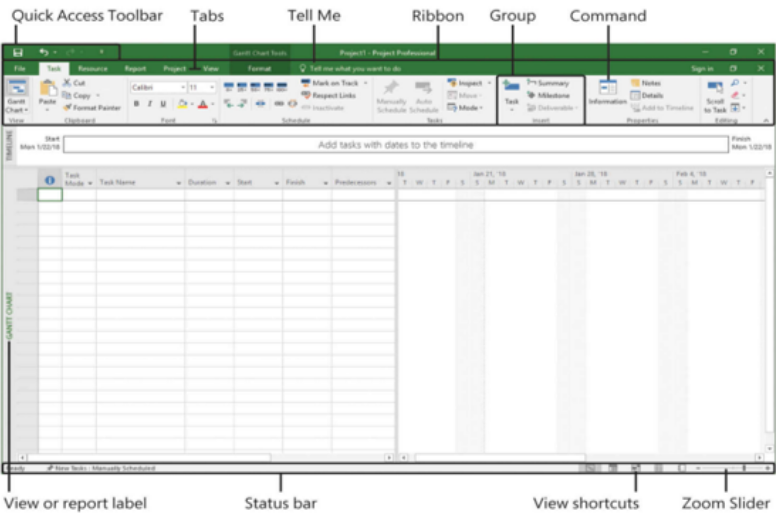
What is Microsoft Project?
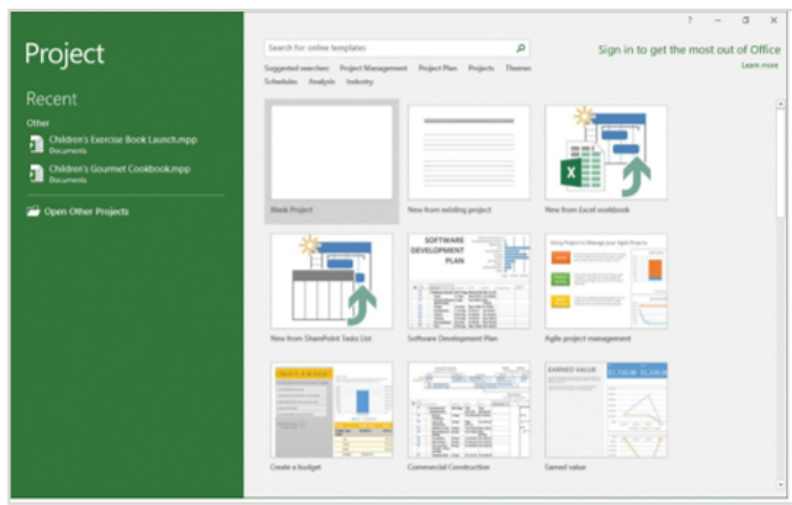
Microsoft Project is a software which is used in project management to assist the organisational projects. The program provides a specific set of tools that allows users to understand and monitor project schedules, project budgets, as well as organise resources and workforces. Microsoft Project is a portion of the larger suite of Microsoft Office products, yet it is not packaged with another Office software, such as Word, Excel, Outlook, etc.
Attending our Microsoft Project training course will enable you to enhance your skills and knowledge so you can effectively operate Microsoft Project software while working as a professional Project Manager. During this training, you will also gain an in-depth understanding of Microsoft Project concepts in a detailed way so you can easily clear you Microsoft Project Masterclass Exam.
 Need More Information
MS Project Certification Course
Best Selling Certification in Canada


 Inquire Now
Limited Budget?
- We understand that people may have a limited budget.
- To help and support our clients, we will provide a limited number of 250 daily discount codes.
- Hurry! First come, First served.
- If you miss out, enquire to get yourself on the waiting list for the next day!
56 Remaining (Live Counter)
 Inquire for Daily Discount
The Largest Global Training Provider
Get CompTIA training from #1 Globally Recognised Training Provider. Best Price Guaranteed!
What You Will Learn?
- This course will teach you advanced topics of how to use Microsoft Project in combination with resources and schedules, as well as:
- New tools of this latest edition of MS Project
- How to create and manage a project with Microsoft Project 2016
- Incorporating Project Management methodologies with Microsoft Project
- How to effectively manage resources in a project plan
- How to explore the Microsoft Project environment
- Assigning resources and levelling
- How to display an existing project plan in different views
- How to create realistic schedules quickly and easily
 Find Out More
Why Microsoft?
The most important fact about Microsoft is the belief with business-critical capabilities such as collaborations, calendar, and email, as it treats the organisation's productivity as its central business. Microsoft users can access their content from anywhere and anytime they want. Microsoft keeps its user's data safe and secures for both mobile and desktop. It is designed to meet the security requirements of organisations from end to end strong governance and security-aware engineering. The uniqueness of the programs offered by Microsoft is its study material out of which you can learn several things that can be implemented in your project. If you are working in the project management field, you must embrace skills to work with Microsoft Project, so you can easily perform various tasks such as managing resources in a project plan, tracking and controlling a project, creating the project schedule, assigning calendars to resources, and more.
 Request for More
Information
Request for More
Information
Delivery Methods
The Knowledge Academy is a World's Leading organisation for training professionals. The Knowledge Academy provides training in 490+ locations over 221+ countries, covering 3000 subjects with four delivery methods which are:


Our Amazing Facts and Figures

100
+Courses Running Daily

490
+Locations Worldwide

2
M+Our Global Learners

2
K+Certified Trainers
Microsoft Project Features
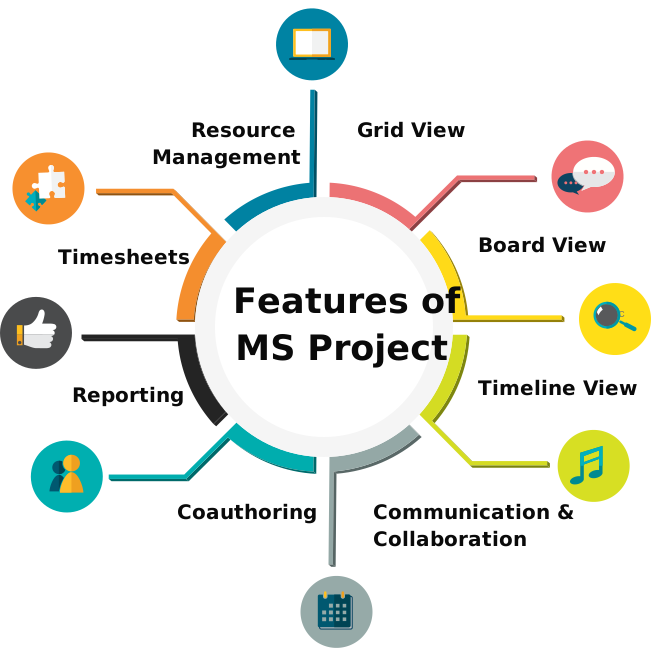
MS Project has several numbers of features that are required by project managers and their teams to perform and manage their work in a better way. However, mention below is a complete list of features provided to customers who spend a lot of money.
- Grid View: A project view is used to manage and plan projects besides a task list.
- Board View: It is a visual Kanban board view that assists in administrating workflow and status.
- Timeline View: The old-fashioned Gantt chart utilised for scheduling tasks over a project timeline.
- Communication & Collaboration: Ability for teams to work collectively on projects.
- Co-authoring: Stakeholders and team members mutually work on editing and updating task lists as well as schedules.
- Reporting: Pre-designed reports that can track portfolios, programmes, progress, and resources.
- Roadmap: Track project portfolios and programmes.
- Timesheets: For invoicing and payroll, it collects project and non-project time.
- Resource Management: Administer resources by requesting and assigning tasks.
 Have a Question?
MS Project Certification Course Packages
Complete Project Manager Certification Package

3 Courses
- Prince2® Foundation & Practitioner
- Lean Six sigma green Belt
- Microsoft Project Masterclass
 Inquire for Package
Office Productivity Package
3 Courses
- Microsoft Excel Masterclass
- Microsoft Power Bi Training
- Microsoft Project Masterclass
Complete Project Manager Tool Package
3 Courses
- Primavera P6 Professional Fundamentals
- Primavera P6 Porfessional Advanced
- Microsoft Project Masterclass
Why Choose Us
Be it an individual or a business, to thrive and grow the key elements is the continuous thirst for knowledge. This thirst for knowledge can be quenched by continuing with education and specially tailored certification programs by The Knowledge Academy.


Best Price Guarantee
You won't find a better value in the marketplace. If you do find a lower price, send us the offer, and we'll beat it.


Guaranteed to Pass Exam
Our Exam Pass Guarantee gives you the confidence that we will support your learning until you pass your exam.


Guaranteed to Run
All our courses are 100% Guaranteed to Run on the dates provided, whether they are a classroom, virtual or in-house.


100% Money-Back Guarantee
We are so confident in our courses and skills of our instructor that we offer a money-back guarantee if you do not pass the exam.
What Our Clients Say About Us
I have not used Microsoft Project in my life before beginning this course. But now I have gained a comprehensive knowledge of microsoft project. This would be very beneficial for my career growth. My trainer Allen was such a fantastic person and a very professional trainer. He delivered everything very nicely and in a very professional way. Overall, the training was fantastic, and I would recommend this training to my friends.

Daniel Williams
Project Manager

Excellent course. Covered many aspects of the microsoft project very well. The course material was good, easy to grab, and the trainer clear most of my doubts very well. I strongly recommended the knowledge academy for everyone who wants to get a good idea and a general overview of the microsoft project concepts.
Adam Clark
Project Scheduler
First time I attended training from the knowledge academy. The course was excellent, and my trainer was knowledgeable and experienced, which was a benefit to the whole training. After attending this training, I can say, knowledge academy is one of the best training providers. In future, I will prefer the knowledge academy for attending more courses.
Stephen Richards
Project Supervisor
Really enjoyed the microsoft project course this week with Steven, the training itself was excellent. He was very helpful and had a lot of information. The way of his teaching was pretty impressive and cleared all my doubts. The course delivery was very well managed. I really enjoyed the training and would book course again in the future.
Jordan Clark
Service Delivery Manager
I purchased the microsoft project course. It was an excellent experience for me. The content was well-structured, which helped me to understand the concepts of the project easily. The trainer clarified most of my doubts. My trainer Danny was a very well-mannered person. The course did a great value and addition to my cv, and I will buy more courses from here.
Joseph White
Project Administrator
Although I knew how to use Microsoft Project but the way my trainer Johnny explained to me everything was outstanding. His communication was excellent and helped me to understand the subject well. This course helped me to get a more in-depth understanding of project management processes and their importance. I really enjoyed the training.
Andy Watson
Project Scheduler

Limited Time Offer
Buy Two Courses and Get the Third One for Free. Hurry Up!
 Hurry Up
Frequently Asked Questions
What is Microsoft Project?

Microsoft Project is a software that is used in project management to assist the organisational projects. Microsoft Project is a strong program that helps individuals to plan and manage a chain of projects.
Whether this course is accredited or not?
Yes, this course is fully accredited by Microsoft Gold Partner, on behalf of Microsoft Partner.
What is a summary task in Microsoft Project?
A summary task in Microsoft Project that is also known as parent task is a group of subtasks that shows their joined information. The summary task is given in bold in the project outline.
What will you learn in Microsoft Project Masterclass course?
In this Microsoft Project Masterclass course, you will learn about identifying the critical path, recurring activities, resources types, and referencing other files in tasks, creating a baseline, filtering report data, and more.
I am unable to find the course I am looking for.
The knowledge Academy provides training on over 3000 different subjects. Please contact us if you are unable to find your ideal course in the above course list.
What are the advantages of Microsoft Project?
There are major advantages of Microsoft project such as the ability to integrate with MS excel, simple management of interdepartmental collaborations, useful in resource management, the better scope of work with the organised process, and more.
Will this course help me to get a better job with a high salary package?
Professionals who hold a Microsoft Project Masterclass Certification get higher rank in companies and get paid more than any average Project Manager.
Who should attend this Microsoft Project Masterclass course?
This Microsoft Project Masterclass is designed for new and existing users who would like to improve their skills in using Microsoft Project such as Project Managers.
Can Knowledge Academy deliver corporate or in-house training?
Yes, our exceptional in-house delivery staff work incessantly to provide training to clients who wish to have the convenience and comfort of working within their familiar surroundings.
What delivery method I can choose for the Microsoft Project training courses?
You can choose below delivery method according to your requirement:
- Online: If you want to learn at your own pace and at any time in the day or night.
- Online Instructor-led or virtual: If you want to learn virtually from the instructor in the comfort of your home.
- Classroom: If you want to attend training in The Knowledge Academy venue.
- Onsite/Corporate: If you are looking for a training solution for your employees or company.
Can knowledge academy deliver the training to more than 1000 delegates of my company?
Yes, we already trained over 1000 delegates from multiple, internationally renowned organisations. In such cases where the delegates are more in number, we are providing training in batches.
Can we customise training and course material according to our company requirements?
Yes, we have subject matter experts who will work according to your company requirements.
Contact Information
We're committed to quench your thirst for knowledge. If you need assistance while booking your Microsoft Project Training, you can quickly access our 24/7 support using Email, Phone Number, or by filling this form.